All posts by David McLachlan

Rolling Wave Planning

– See All Project Management Key Concepts –

Rolling Wave Planning - PMBOKRolling Wave Planning

What is Rolling Eave Planning? It is an iterative planning technique, which should tell you that we’re really delving into the realm of Agile, where we’ve got iterations and we’re delivering in increments. This is where rolling wave planning can come into it, because in the near term it is planned in detail, so things that are coming up quite close are planned in great detail, while the further work way out here for example is planned at a higher level, where we just want a basic idea of the stuff coming up way off in the distance.

Rolling Wave Planning is a form of progressive elaboration. Because of that, it’s applicable to work packages, which are the packages that we’re assigning to our teams to deliver as part of our project, planning packages and also release planning when using an Agile approach.

The techniques that you’ll see for Rolling Wave Planning include Decomposition, because we’re starting with a high level (for example a feature if we’re using Feature Driven Development) and we’re decomposing that into into work packages that our teams can work on and then deliver for that iteration.

When we get into iterative scheduling with a backlog of work, let’s say that our feature wants to be delivered for this particular two-week iteration, and we’re breaking that down, assigning that to our teams, saying “Can you work on this,” “Can you get it delivered for the end of our iteration,” and if yes for this particular one then that goes from the backlog into the sprint and a Kanban board, into that iteration for the team to work on.

So why do we do Rolling Wave Planning? During our early strategic planning, when information is less defined, work packages may be decomposed to the known level of detail. When we’re first doing a project charter for example, we don’t know all of the nitty-gritty detail. So we might have to start with a high-level feature or a high-level idea and work from there. As we get closer to working on those items, then we break it down as more is known about those upcoming events in the near term. Those work packages can be decomposed and that’s that key term from the PMBOK guide – they can be decomposed into the actual activities that we will perform to get that work done.

And that is Rolling Wave Planning.

– David McLachlan
– See All Project Management Key Concepts –

Schedule Compression

Project Schedule Compression Techniques
– See All Project Management Key Concepts –

Project Schedule Compression Techniques - PMBOKProject Schedule Compression Techniques

What happens if we want to compress our schedule? Maybe it’s going to take a long time and we want to make it shorter – that’s where schedule compression techniques come into play.

Schedule compression is a technique that’s used to shorten or accelerate the schedule duration without reducing the project scope. We still want to deliver what we are delivering – that business value as part of our project – but we might have certain schedule constraints, imposed dates that we need to meet or other schedule objectives. So we need to compress that schedule.

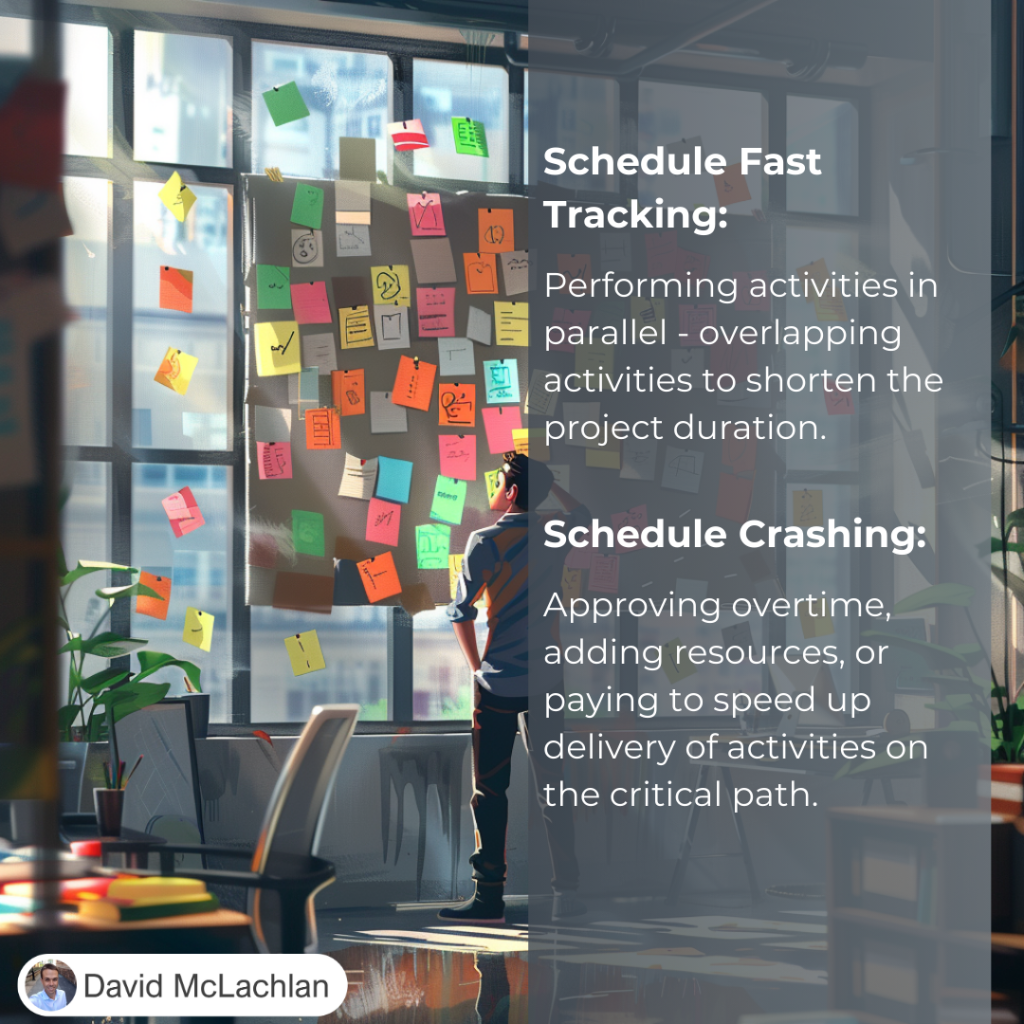
There are two main compression techniques that you’ll see on the PMP exam and in the Project Management Body of Knowledge, and even in your project management career. Those two are “crashing” the schedule, which shortens the schedule duration by adding resources. That can be very costly as we’re adding more people or things. The other one we’re looking at is fast tracking, where activities or phases normally done in sequence are now performed in parallel or at the same time for at least a portion of their duration. That way we’re able to cut back on the time frame.

Schedule Compression

Let’s look at a few examples.

Crashing might involve approving over-time, adding resources, paying to expedite the delivery of activities on the critical path. Of course because of that crashing may result in increased risk, and certainly an increased cost.

As an example up the top here we’ve got Task 1, Task 2, Task 3 as our normal schedule with just one person assigned to each. But if we’re crashing this project schedule we’re adding resources to it, so now all of a sudden we’ve got a lot more resources there and we’re able to shorten the time of that task.

You have to be aware of the law of diminishing returns here, where sometimes adding more and more people -your return on that investment will get less and less over time. Sometimes adding more people isn’t the answer. But in this case, when we’re crashing a project we’re looking for that to be the answer to reduce our project schedule.

The other one is fast tracking, where we’re performing tasks in parallel. Again this might result in rework and an increased risk and cost, and it only works when activities can be overlapped to happen at the same time, to shorten the project duration on the critical path. We’re using the lead time, if there’s any lead time that we can take up we’re using that to perform those tasks in parallel. For example one, two, three in sequence but now one, two, three we’re performing some of these activities at the same time by fast tracking our project. Because we’re able to do that we don’t have to add more resources in this case, so the cost is a little bit less than if we were to crash the project with project resources. And that is the idea of schedule compression, crashing your schedule and fast tracking your schedule.

– David McLachlan

– See All Project Management Key Concepts –

The Critical Path and Float

– See All Project Management Key Concepts –

Critical Path and Float - PMBOKThe Critical Path and Float

This is separated into two parts, with the first outlining the Critical Path, and the second doing the forward and backward pass on the critical path method. Now all of this it can seem a little daunting at first, that’s why we’ve just separated it into two videos, but ultimately this one will give us a broad overview and the next one we’ll delve into it in a little bit more detail.

What is the critical path?

The critical path is the longest sequence of activities that make up a path through a project – so it is the longest sequence of activities, and that determines how soon were able to actually complete our project, which gives us the shortest possible project duration.

It’s the path that doesn’t have any slack in it – so there’s no leeway, no room to move, and that’s why it’s the most critical path.

The critical path method is used to calculate the critical path in our project, and the amount of free float and total float, which is the flexibility that we have in our schedule. Float is the leeway that we might have – can we delay an activity by one day or two days? If there’s two days of float, then yes.

Let’s have a look at an example.

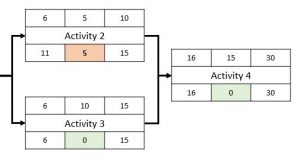
Let’s say we’re starting our project schedule, we’ve got these durations in the top middle of our schedule network diagram. In this case we’ve got the durations of 5 days, 5 days, 10 days for this one and 15 days for our last one. The float is described in the bottom middle box, so we’ve got zero days of float. In other words, there’s no leeway for this one there’s no leeway for this one and there’s no leeway for this. That means our critical path is A, C and D.

If you noticed we’ve got five days of float here, that means we could potentially delay this activity by 5 days, there’s a little bit of leeway and we’d still be able to get the project done at the same time. That’s the idea that we’re looking at.

So again broadly or at a high level, Free Float is the amount of time that a scheduled activity – so a single activity – can be delayed without delaying the early start of any of its future activities. Total float or project slack is measured by the amount of time that a scheduled activity can be delayed or extended without delaying the project finish date. So zero float, as we said, is shown on the critical path. There’s no leeway on that critical path, and that’s why it’s critical.

We will delve into this in more detail looking at the critical path method and the forward and backward pass to calculate all of these lovely values as part of your schedule model.

– David McLachlan

– See All Project Management Key Concepts –

Project Variance Analysis (CPI and SPI)

– See All Project Management Key Concepts –

Variance Analysis - PMBOKWhat is Variance Analysis?

Variance analysis is really important because you’ll come across it not only in your projects but also throughout the PMP exam. What we’re doing is we’re reviewing the differences or the “variances” between the planned and the actual results of our project. That performance could be in our Cost or it could be in the Time or the Schedule, where we’re going along with our project. You can see duration estimates, cost estimates, resources and technical performance of our project and other activities and metrics. All of these things will differ from the way that we have planned – we can’t see the future unfortunately (no matter how hard we try) so the best we can do is plan up front and then track those actual results and see the variance between those results. And that’s where variance analysis comes in.

With variance analysis we might have examples such as Schedule Variance, where we’ve got our Earned Value (EV) minus our Planned Value (PV). Let’s say we’ve earned a hundred thousand dollars worth of value in our project and but we had actually planned say 150 thousand dollars worth of value. Then ultimately we are fifty thousand dollars behind in our in our project at the moment.

Likewise, the Schedule Performance Index (SPI) is Earned Value divided by the Planned Value. Let’s give ourselves another example – if we’ve earned seventy thousand dollars worth of value but we had actually planned a hundred thousand dollars (this is a nice easy one) then obviously 70 divided by 100 we’re looking at seventy percent, or point seven for the Schedule Performance Index.

As you can see, if we’re less than one we are behind schedule, if we are over one then we are ahead of schedule – we’ve delivered more value than what we were expecting.

We’ll go into these in more detail as we go into Project Cost Management and Project Schedule Management, but this is a really broad overview.

Cost variance and Cost Performance Index are similar to the schedule variance and SPI. When we’re looking at the Earned Value – let’s say that’s seventy thousand dollars again, minus the actual cost (let’s say we’ve only spent fifty thousand dollars) then all of a sudden we are twenty thousand dollars ahead in that scenario.

For the Cost Performance Index, if it’s under one then we’ve delivered less value so we are over budget. While this is a little bit confusing, if we’re over 1 for our Cost Performance Index then we are under budget because we’ve delivered more value than 1, which would be the normal amount.

These are a few examples of Variance Analysis, and you will come across more as we go through Schedule Management and Cost Management and the other project management processes in the project management body of knowledge. I hope this has helped, I’ll see you next time.

– David McLachlan

– See All Project Management Key Concepts –

Project Estimating Techniques

Project Estimating Techniques

– See All Project Management Key Concepts –

Project Estimating Techniques

Project Estimating Techniques

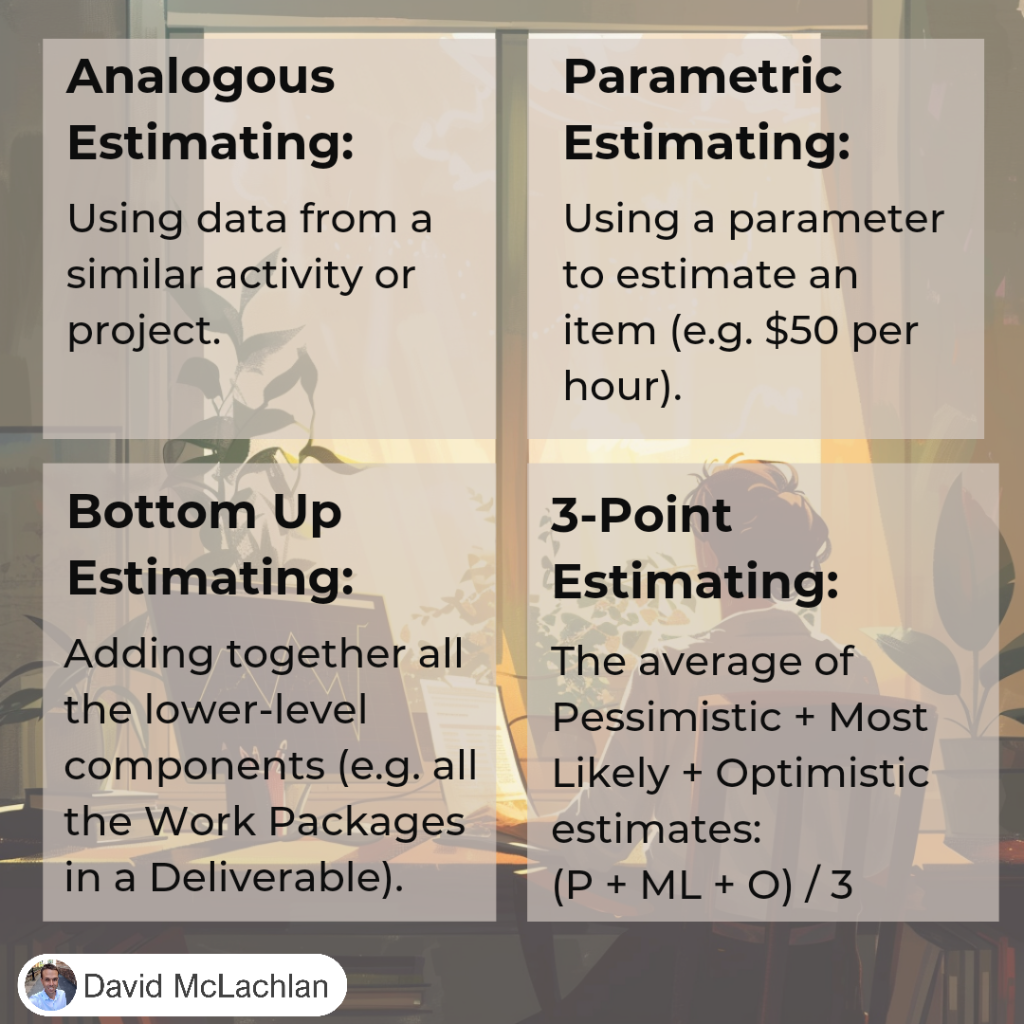
You will definitely see project estimating techniques mentioned as part of the PMP exam, so it’s good to know the four main different types and the differences between them.

Throughout your project you’ll be asked to make those estimations of future performance, and that could be in your Schedule, it could be in the Cost of the project, it could even be in the quality of your project. The four main methods that you will come across as part of the PMBOK guide are:

  • Parametric estimating
  • Bottom up estimating
  • Analogous estimating, and;
  • 3-point estimating.

They might sound a little bit funny at first, so let’s go into them in more detail.

First of all we’ve got parametric estimating. This is where we’re actually using a parameter to estimate per item. So it’s a simple parameter, for example 55 meters or $55 per square meter or square foot. We might have a thousand dollars per roll of metal, or twenty days per delivery in our schedule for example, where it might take to get something to another country. We might be looking at two-week sprints per each feature that we’re delivering in a software project, or a team might take an eight-hour workshop to complete a risk assessment. All of these are parameters that we might assign to the activities so that we can estimate for those activities.

Next up we’ve got bottom up estimating. This is where we’re estimating project resources by assigning a value to the lower-level components of the Work Breakdown Structure. We’re starting from the bottom and we’re working our way up. And when we say the bottom we mean the the lower level tasks that have been assigned to our teams. Now these of course go up in the work breakdown structure to the larger tasks or features, and then to an overall delivered feature (and this is where we start getting into Agile potentially or Feature Driven Development) but the idea of that is that this team can estimate on their piece of work, this team can estimate on their piece of work or their single task or one or two tasks, and that might be say $10,000, this one might be $20,000, this one might be $5,000, and then we take all of those items and we bring them up into the feature so the total there could be $50,000 and then the total for the overall feature could be $100,000 for example. But the key is that we’re starting at the very lowest level of the activity, we’re starting from the bottom.

Next up we have Analogous estimating. This is where we’re finding an analogy, something similar to what we’re currently doing. We’re estimating the duration or cost of an activity or a project using historical data from a similar activity or a similar project. Of course this is frequently used to estimate project duration when there is a limited amount of detailed information, so we haven’t gotten down into the Work Breakdown Structure yet at the team level, we only have a really high-level idea. Using Analogous Estimating we can get a rough idea of how much it will cost, or how long it will take by looking at another similar project. It’s like an analogy, it’s similar to what we’re currently doing. Generally it’s less costly and less time-consuming than our other techniques, but also it is less accurate because we’re not really delving into the detail.

Last but not least there is 3-point estimating. This uses an average of three points – we might have the Optimistic estimate, the Pessimistic estimate, and the Most Likely estimate. The way that we end up working it out is: Let’s say our Optimistic schedule (O) is five days, our Most Likely (M) is seven days and then our Pessimistic (P) is ten days. We add each of them together and then we divide that by three, and that gives us the answer.

In fact here’s a better version that doesn’t take as much math or any decimals – let’s say we’ve got five, nine and ten divided by three – because 24 is a nice round number – we divide that by three and we get eight. And that’s how we do three-point estimating.

You might see a variation of this which is “Beta” or “PERT” (Program Evaluation Review Technique), where we’ve got Optimistic, then four times the most likely, and then our pessimistic as well, all divided by six instead.

And those are the project estimating techniques we will come across in the PMP Exam.

– David McLachlan

– See All Project Management Key Concepts –

The Four Value-Driven Delivery Principles

– See all the Agile Certified Practitioner Videos –

What is it?

An Agile Certified Practitioner focuses on Value Driven Delivery – delivering value to the customer as soon as possible. There are four parts:

  1. Define positive value
  2. Avoid potential downsides
  3. Prioritisation
  4. Incremental development

Define Positive Value

This means project requirements (features) are prioritized based on value. This prioritised list forms the backlog of work. Then the development team works to deliver the most-valuable items first.

Define Positive Value: Step-by-Step

  • Define a customer-valued list of deliverables or features that can be produced incrementally in order.
  • Refine the requirements for these features by gathering their acceptance criteria – the “definition of done”.
  • Work to improve the team’s process over time through retrospectives, in order to optimize value delivery.

Avoid Potential Downsides

This means delivering in increments of value, so the customer can provide feedback, changes in priority, and address risks in the project incrementally too.

Avoid Potential Downsides: Step-by-Step

  • Organise requirements into “Minimum Viable Products” (MVPs) – small, releasable increments – in order to deliver value early.
  • Solicit customer and user feedback by reviewing these increments often.
  • Limit increment size and review with the customer frequently to confirm business value, and identify and respond to risks early and at minimal cost.

Prioritisation

This means we prioritise the backlog of requirements from most value to least value (in the customer’s eyes), and we periodically update and reprioritise with the customer or product owner so the team is always working on the most valuable items.

Prioritization: Step-by-Step

  • Prioritize the increments or features by collaborating with the customer (or customer-based stakeholders such as the Product Owner).
  • Perform frequent reviews of the backlog list to ensure it has the most value delivered first.
  • Continuously the team process to ensure quality deliverables.

Incremental Development

This is where the work gets done. By delivering in increments the team addresses the most valuable requirements first, addresses risk in smaller doses, ensures features are reviewed and deliver what the customer wanted, and future features are still in the right order.

Incremental development: Step by Step

  • Create periodic checkpoints with stakeholders to gain feedback to current and future work, by performing inspections, reviews, and/or testing .
  • Incorporate both value-producing and risk-reducing features into the backlog.
  • Elicit relevant non-functional requirements (such as operations and security) as well.
  • Re-prioritize requirements periodically in order to reflect changes in stakeholder needs or preferences

These four domains are the key for the Agile Certified Practitioner. Understand that the goal of Agile is to identify value, rank the value based on the customer’s needs, protect the value, and deliver value through increments.

– See all the Agile Certified Practitioner Videos –

Six Ways to Prioritise Requirements in an Agile Team

– See all the Agile Certified Practitioner Videos –

What is it?

Agile project management is largely based on the development team completing the requirements from most important to least important, as picked by the customer.

We may need to help or work with the customer to prioritise these requirements, using the following tools.

MoSCoW

  • Must have: Needs to be included for the project to be successful.
  • Should have:This will add value but isn’t essential for the project to be successful.
  • Could have:Would be nice but we could ultimately do without.
  • Will not have:We can leave these until last (if there is budget or time remaining) or not at all.

Kano Analysis

Kano analysis operates on the idea of:

  • Delighters or attractive quality: That provide an extra special (above and beyond) experience but no dissatisfaction if not there.
  • Satisfiers or one-dimensional quality: Where a customer is satisfied if there, and dissatisfied if not there.
  • Dissatisfiers or must-be quality: the most basic requirements that customers take for granted, where the customer is dissatisfied if they are not present, but not additionally satisfied if present.

Fist of Five

The Fist of Five is a voting technique that allows the team or stakeholders to vote on requirements when a clear decision can’t be made.

  • The team facilitator asks the team to show their level of support for an item.
  • Each team member responds by holding up the number of fingers that corresponds to the level of support (five is the most).
  • If a team member holds up fewer than three fingers, she is given the opportunity to state their objections and the team may respond.
  • The fist of five continues until everyone holds up three or more fingers or agrees to move on.

Multi-Voting

Also “Voting with Dots”.

  1. Sum up the number of requirements
  2. Give each person 20 percent of that number in dots (for example, if you have 10 potential items to vote on, each participant receives 2 dots)
  3. Participants put a dot next to the items they think are most important.
  4. Sum up the dots for each requirement and rank the requirements by their votes.

You can also make the second step private, so people don’t follow the crowd or be afraid to vote on items that have received smaller numbers of votes.

Spending Monopoly Money

Spending Monopoly money gives each stakeholder an equal amount of pretend cash to spend on the different items in the requirements backlog.

  • Participants can put all their money on one feature or item, or they can spread it out over the items they believe are most valuable.
  • You then sum up the amount spent on each feature and rank them accordingly.

Lean Customer Benefits

A Lean method of prioritising requirements against the customer driven metrics can also work. Rate each requirement from one to five against the following:

1. Quality

How much will it reduce defects, reduce rework, or increase longevity?

2. Delivery

How much will it reduce the time from order to fulfillment? Or, increase the speed.

3. Cost

How much will it reduce the cost to produce the item?

Making a list of requirements and prioritising them according to customer value is a core component of Agile. Use these tools to your advantage!

– David McLachlan

– See all the Agile Certified Practitioner Videos –

Decomposition

– See All Project Management Key Concepts –

Decomposition - PMBOKDecomposition

What is decomposition in your project? It’s a technique that’s used for dividing and subdividing the project scope and project deliverables into smaller, more manageable parts. You’re taking something high level and turning it into more manageable pieces, and then maybe those pieces are turned into more manageable pieces as well – that’s decomposing, we’re breaking down that item into smaller pieces.

The level of decomposition is often guided by the degree of control needed to effectively manage that project. For some projects maybe that high level description is enough, and someone can go away and work on that. But in other cases you will need to break it down so that multiple teams will work on these different items and deliver those separate pieces.

Here’s where a work breakdown structure comes into it, and decomposing from a work breakdown structure. Basically we’ve got some branches of the WBS decomposed down through the work package level. We start with the first high level idea, we’ve got a value management system project and then we have the needs assessment, we’ve got standards development, systems engineering, project management as well. As part of that needs assessment we might have a current system ordered, we’ve got requirements determination and we’ve got alternatives development. All of these things need to be done as part of that needs assessment – we’re breaking it down into smaller and smaller parts, pieces that people can actually work on.

Now of course you could do this for an organizational structure as well. You might have an executive and they might have managers at their different levels and then they might have team leaders at levels further down, and you need you might need to know this as part of your stakeholder mapping for your project.

So decomposing things and breaking things down is a very useful way to do your work as a project manager.

Decomposition of the total project work into work packages generally involves the following activities. First of all, we’re identifying and analyzing those deliverables and the related work to those deliverables. We’re structuring and organizing the work breakdown structure, breaking things down into smaller pieces. We’re decomposing those upper layers and levels into the lower detailed components, then we’re developing and assigning identification codes to the WBS components similar to our requirements traceability matrix.

We need a code just to identify that – is it 101, or is it R55? Whatever the code is that makes sense or that you have assigned to these particular items and deliverables. Then we need to continue on as part of our WBS or work breakdown structure. As we’re breaking it down, we need to verify that the degree of decomposition for those deliverables is appropriate. We do that by either assigning it to the appropriate team and making sure that they have enough information to be able to work on this. If we’re using an agile methodology then we would break it down to enough work that could be done usually during a two-week sprint, and we might have multiple two-week sprints. Can they get that done? If not then maybe we need to break it down into smaller pieces of work that we know we can get done in that two-week sprint, so that we’ve got something to deliver at the end of that iteration.

And that is the idea of Decomposition.

– David McLachlan

– See All Project Management Key Concepts –

Validate Scope versus Control Quality

– See All Project Management Key Concepts –

Validate Scope versus Control Quality - PMBOKValidate Scope versus Control Quality

The reason we’re looking at these two in particular is because validate scope and control quality can be confused during your PMP exam. So this is really quick outline of both and what the differences are when you use them so that you will know this specifically for when you get questions about these two items in the PMP exam.

Now, one of these is concerned with having the deliverables signed off (Validate Scope). We’re validating that the scope is okay, and we’re able to sign it off but the other is concerned with ensuring the deliverables are working as they should (Control Quality) – we’re controlling that quality, and we’re testing and were ensuring that they’re working in the way that we wanted them to work.

Here’s where they sit in the project management process groups. They’re both monitoring and controlling processes, and the first one is under scope because we’re validating that scope. We’re signing off that scope and it’s going back to our product sponsor or stakeholders. They’re saying “Yes, I can see that everything is fit for purpose,” and they’re giving it the tick of approval. But before it actually gets to that stage, we are controlling that quality.

With Control Quality, we’re testing it, we’re wanting to make sure that it’s OK, and that it meets the requirements that we had. As we control that quality, once that is complete then that will usually feed into the validation and the sign off of those deliverables. So as you can see deliverables are verified for quality during the control quality process, but they become the input into the validate scope process where we’re signing it off and giving that final tick of approval by the stakeholders.

So Control Quality is the testing and checking of that deliverable to ensure it meets the requirements, we’re usually testing fit for purpose. But Validate Scope is that process of formalizing the acceptance of the completed project deliverables signed off and approved by the authorized stakeholder.

And that is the difference between Control Quality and Validate Scope.

– David McLachlan

– See All Project Management Key Concepts –

The Psychology Behind Kanban

– See all the Agile Certified Practitioner Videos –

What is Kanban?

Kanban in an Agile team focuses on minimising “Work in Progress”. It uses a board, where task cards are placed, and move across each column from the “Backlog”, to “In progress” to “Done”.

Kanban gives a team a feeling of Progress.

Professor Teresa Amabile

Teresa Amabile and Steven J. Kramer found in their study of more than 12,000 employee journal entries over a prolonged period of time that it wasn’t money, perks, recognition or time-off that contributed to their happiness.

It was a sense of progress, specifically progress in meaningful work.

People were also 50% more likely to find creative solutions on the days they reported their most positive moods, that came from making progress.

Dr Jason Fox

Dr Jason Fox took the idea of progress one step further, specifically:

To make progress visible.

So everyone can see it, and everyone is on the same page.  It is the “Kanban Board” of a team.

Kanban gives a team Clarity on the work and what is expected.

Mihaly Csikszentmihalyi

Released a study outlining three things in place when a person experienced the “flow state”, a state of ease and happiness.

Those were:

  • When the person knew what to do every step of the way
  • The person could tell clearly and immediately if he or she had made a mistake
  • The skills of the person were more or less in balance with the challenges that the activity provided

Gallup

In 2015 the Gallup Business Journal studied more than 190,000 employee engagement responses and found that 50% of employees were not clear on what was expected of them at work.

Of these, only 4% were “engaged” in their work.

Companies where employees were clear on what was expected of them saw a 34% jump in engaged employees.

– David McLachlan

– See all the Agile Certified Practitioner Videos –