Category Archives: Project Management Key Concepts

Cost Forecasting Techniques with Estimate at Completion (EAC)

– See All Project Management Key Concepts –

Cost Forecasting Techniques

It’s time to look at the Cost Forecasting techniques that you will see as you go through your project management career, and definitely in the PMBOK guide.

So what is cost forecasting? As the project progresses the project team may need to develop forecasts for how much it will cost to complete the project, and compare these to the planned budget (such as the Budget at Completion or BAC). Maybe the project is going on track, but maybe it’s going along off track, or maybe it’s the cost is blowing out.

The value you’re delivering is changing because everything changes, and sometimes things just don’t go to plan. So we have to figure out how much is it going to cost us to finish all of the work that we’ve got, and that’s where this cost forecasting comes into play.

There are four main things that you will see on the PMP exam and in your project management career, and the main one that we’re looking at today is the Estimate at Completion, because there are lots of different ways of measuring and calculating this. But the other ones that we’ll go through in another article are the Estimate To Complete (ETC), the Variance at Completion (VAC) and the To Complete Performance Index (TCPI).

The scenario that we’re going to go through for all of these is we’ve got a project budget of $10,000 (the Budget at Completion) where 30% is completed (that’s our Earned Value / EV) against 40% planned (that’s our Planned Value) and $5,000 spent so far (this is our Actual Cost). So you’re going to see these things come up time and time again and we’re going to use these in the calculations for this particular project scenario.

Let’s jump into Estimate at Completion, and the many different ways that you can calculate this particular one. Estimate at completion it is the estimated total cost of completing all the work.

Basic EAC, When Work Proceeds as Planned

The first one we’re going to look at is the Actual Cost (AC) plus the Budget at Completion (BAC) minus the Earned Value (EV). This one is used for when everything is just going to be completed at the planned rate, so no matter what’s happened before we’re still still expecting things to proceed as they were planned.

Remember our budget at completion is $10,000, 30% is completed (that’s our earned value) and our planned value was 40%, so $4,000. $5,000 is our actual cost. Let’s jump into it – $5,000 plus our budget at completion ($10,000) minus our earned value ($3,000) equals twelve thousand. That’s what we’re expecting to have to pay to complete this project, the estimate at completion.

Notice that it’s different to our budget, what we had planned. We’d actually planned $10,000 and now it’s going to be $12,000, so this is going to factor in, we’re going to have to adjust, possibly do a change request, get more money, maybe use some of our management reserves, all of these things you’ll delve into in the PMBOK guide as well. Let’s look at the next one.

EAC, When Cost Performance Index Influences Future Work

We’ve got our Budget at Completion (BAC) divided by our CPI (Cost performance index), and our CPI is our Earned Value divided by our Actual Cost.

Let’s delve into the calculation. BAC of $10,000, divided by CPI (30% of $10,000 divided by $5,000 actual cost). So our CPI is our earned value divided by actual cost equals 0.6, and our $10,000 budget at completion divided by 0.6 gives us $16,667. So if the cost performance index is going to impact our project then it’s actually going to end up we’re going to be behind for the rest of our project and it’s going to be more than our other estimate. So this is a really good thing to know if the cost or performance index is going to impact our estimate at completion.

There’s two more to go, let’s delve into them.

EAC When CPI and SPI Influences Future Work

This one is if both the CPI (cost performance index) and the SPI (schedule performance index) influence the remaining work. Previously we just had the CPI influencing the remaining work, now we’ve got CPI and SPI. So basically we’re just including those calculations in our Estimate at Completion.

EAC = AC + [(BAC – EV) / (CPI * SPI)]

So the actual cost ($5,000) plus budget at completion minus earned value ($10,000 – $3,000 = $7,000) divided by our CPI (cost performance index, 0.6) multiplied by our SPI (schedule performance index). This is probably one of the most complex ones. And even if you do get on the exam, you really need to know when you would use these particular things, so if the CPI and the SPI influence the remaining work then you will have to use this longer calculation because these two things are included. So our schedule performance index is EV / PV ($3,000 divided by $4,000) gives us 0.75.

So we’ve got all of these and when we multiply those two things (SPI and CPI) together we get 0.45. So that’s our answer there – we’ve got $5,000 plus $7,000 divided by 0.45 which (plus AC) equals $20,055. Because we’ve got cost influencing and schedule influencing, and we’re behind on cost and we’re behind on schedule, and we get a higher estimate again.

EAC with Bottom Up Estimate

Now lastly you do need to know that your Estimate at Completion could just be your your Actual Cost so far (which is $5,000) plus your bottom up estimate to completion. You may actually just figure all those costs for your project and add that to the total cost that you’ve spent so far. That’s another way if you need to change plans completely and everything has gone off the rails.

Those the different ways that you’ll look at your Estimate at Completion, and this is the foundation for the rest of the cost forecasting methods that we’re going to see when we check them out in the next video.

– David McLachlan

– See All Project Management Key Concepts –

Earned Value Analysis

– See All Project Management Key Concepts –

Earned Value Analysis - PMBOKEarned Value Analysis

You’ll see earned value analysis come up a lot in the PMP (project management professional) exam and in your project management career. Earned value provides a current view on the scope, the schedule and the cost performance of your project. What it helps do is compare the performance of your project, or what was actually planned to what’s happening in your project – the actual schedule and the actual cost performance as our project goes along.

There are three main concepts for earned value management and earned value analysis.

The first one is Planned Value (PV), which is what we’ve planned for our project. Then Earned Value (EV) which is the percentage of what we’ve delivered for our project, and then the Actual Cost (AC). So what we’ve actually spent on our project so far. We also use all of this when we’re looking at variance analysis. Other factors we will use include the budget at completion (BAC), which is what we had planned as our budget for the project.

Let’s look at a couple of examples Planned Value. PV is the authorized budget allocated by phase over the life of the project – as the project is going on at a given point in time. Planned value defines the physical work that should have been accomplished at this stage.

So let’s have a look at what that means. If we’ve got a project budget at completion (BAC) of $10,000 where 30% has been completed but we had 40% that we had planned to be completed at this stage, and we’ve spent $5,000, then our Planned Value is what we’ve planned to be completed – 40% of $10,000. That’s $4,000 as our Planned Value.

Earned value (EV) in this case is the budget associated with the authorized work that has actually been completed. Earned value is often used to calculate the percent complete of the project. It’s what we have delivered so far for our customers. Now obviously that’s not the same as what we have spent on our project so far and that’s why we separate the two.

So in our example, $10,000 where 30% is completed, 40% was planned and $5,000 was spent so far, Earned Value is what we’ve earned on our project and it’s 30% of $10,000, which is $3,000.

Actual cost is simply the total cost incurred. So anytime you see how much we’ve spent, that is the actual cost of a project. For our example we have $5,000 spent so far, so the Actual Cost is five thousand dollars.

Now once we know all of these things and the budget at completion that we had planned we can use these for variance analysis to see how a project is tracking. This will give us things like the cost performance index, schedule performance index, cost variance and schedule variance, and we will be using all of our earned value analysis tools, the things that we’ve just looked at, to plug into all of these calculations as well.

And that is earned value analysis.

– David McLachlan

– See All Project Management Key Concepts –

Management Reserves versus Contingency Reserves

– See All Project Management Key Concepts –

Management Reserves versus Contingency Reserves - PMBOKManagement Reserves versus Contingency Reserves

Why are we talking about management and contingency reserves? Very simply, management reserves and contingency reserves are used for different reasons in your project and your project and budget, and they can get confused both in real life and during the PMP exam. It’s a good idea to make sure you have it clear as you will likely get a question on this in your PMP exam.

The Differences Between Management and Contingency Reserves 

What are the differences? Management reserves are added to the overall cost baseline – let’s say we have the overall project cost baseline here, that’s our project cost and then we actually add a little bit on to the top of that as our management reserve. That is used for our “unknown unknowns”, things that we have not foreseen, things that we haven’t looked at, risks that we did not know about or that could happen, risks that were not planned.

Contingency reserves are another story. They’re actually used within the cost budget and the cost budget baseline and they’re allocated for risks that we have thought about, so we know that those risks potentially could happen. These are used in work packages or activities – the activities that our teams are performing to deliver a particular feature – and for those we attribute a cost, and the cost we add contingency reserves within each of those activities for any of the risks that we have looked at that we see that might be coming up as we go along in our project.

Let’s look at an example. As you can see on the left here we’ve got the total amount, the project budget all the way up here but what is that made up of? Well, we’ve got our cost baseline, our total cost and then the added management reserve for any of those “unknown unknowns”, the risks that we have not foreseen.

Then we’ve got all of the other items and our work packages over here. This is an estimate of our work package and in that we add our contingency reserve for any risks that we have looked at and that we know might be coming up – we’ve got a little bit of a contingency just in case they do these risks appear.

That all feeds into the cost base line, and then we add the management reserve on top of that. In another example as we’re going along on our project where we’ve actually exhausted our budget at completion (BAC), we can tap into that management reserve, and that is our final project budget including that management reserve of any of those unforeseen risks.

And that is the idea of project reserves for your project.

– David McLachlan

– See All Project Management Key Concepts –

Lead Time and Lag Time (Project Schedule)

– See All Project Management Key Concepts –

Lead Time and Lag Time - PMBOKLead Time and Lag Time

The reason we’re looking at this is it can often get confused when we’re looking looking at examples in the PMP exam. It is really good to get a good idea of it, as you will find these questions on the PMP exam, so it’s good to get your head around it first before going into the exam. Also then you can use it in your project management career.

Lead time and Lag time refers to your schedule, during your schedule analysis.

Lead time is the amount of time that the next activity can be brought forward. So two activities can be done in parallel. Lag time when we’re referring to the amount of time that the next activity will be delayed – so it’s lagging behind. Lead time we are leading it forward.

Now remember in Precedence Diagramming Method or the Critical Path Method, we can have different task dependencies such as Finish to Start, Finish to Finish, Start to Start, or Start to Finish, where for example the second activity cannot finish until the first activity has started.

Lead time only applies to our Finish to Start, where our next activity cannot start until our previous activity has finished. But lag time can affect all of these, so any of these activities can lag behind or have a lag in between those two activities.

Let’s look at an example of Lead Time.

This is a photoshoot for example, and it will take four days. Photo editing will take six days after that. Now instead of waiting until the end of the four day photo shoot to begin editing those pictures we could start editing after the first day of shooting. Then instead of 10 days in total (because we’ve got four days photographing and six days editing) we’re bringing the photo editing forward, we’re leading it forward, and using that lead time that’s available. Now our total time sits at 7 days instead of the 10 days, because we’ve led it forward and we’ve taken advantage of that.

As you can see, the two items are now done in parallel, they’re done at the same time for a portion of those activities.

Lag is moving it the other way. Let’s say for a house, a house frame might take five days to put up but it also has to wait five days after the concrete foundation has been laid – we don’t want to put anything on that concrete foundation in case it messes with the integrity of that concrete foundation for example, and we just want to make sure that it sets properly. So we have to have a lag in our project schedule, that’s the five day lag for our concrete to set. Our second activity here is lagging behind the first activity and that lag in this case is five days long.

That is the idea of leads and lags in your project schedule.

– David McLachlan

– See All Project Management Key Concepts –

Calculating Float with Forward and Backward Pass

– See All Project Management Key Concepts –

Forward and Backward Pass Critical Path - PMBOKThe critical path method, and calculating float using the forward and backward pass.

This is something that can really trip people up, and it is something that’s also good to know for your general project management activities and for the PMP exam. First of all, we’re assuming that you understand what Float is, which is basically any leeway that you have, or any any wiggle room that you have in the project schedule.

This is an example project schedule here. We’ve got Activity 1, 2, 3 and 4 and this is our schedule Network diagram where we’re describing the different times for our schedule. For example, the early start of this activity, the early finish, the activity name, the duration of that activity, the late start, the late finish and finally the float or leeway that we have in that particular activity, that gives us any leeway that we have in the overall project schedule.

So what is the forward and backward pass how we go to use it?

Well, when finding our critical path which is the path that has zero leeway, we first need the early start and early finish times. And we do that via the forward pass. So that’s our first step.

Second step is a backward pass. That’s how we get the late start and late finish times.

And then finally to calculate float we look at the difference between the late start and the early start, and the critical path ultimately is the path that has zero float on all of those activities.

Now that is quite a bit to take in. So the best way is to go through an example and this will really help.

Step 1 – Enter the Durations

First of all, we want to enter the durations of each activity. How long is it going to take? Even if it’s an estimate – this one we’ve got five days, five days, 15 days – that’s their durations.

Step 2 – Perform the Forward Pass

  • Early Start and Early Finish times
  • EF = ES + Duration – 1
  • ES = (highest) previous EF + 1

Now that we have activity durations, we can perform the forward pass, which is all about Early Start and Early Finish times. We’ve got our early start on the left, and early finish on the right, and the way we figure this out is once we’ve got our first early finish we add one, and that’s our next early start. In our first activity’s case we’ve got 5 plus 1 is 6 is our next early start. The highest previous early finish of 15 plus one equals 16 on our schedule Network diagram.

Step 3 – Perform the Backward Pass

  • We calculate our Late Start and Late finish times
  • Enter highest EF in last box
  • LS = LF – Duration + 1
  • LF = (lower) LS – 1

Once we have the early start and finish times we can get the late start and late finish times via the backward pass. The way we do that is we enter the highest early finish in the last box. So obviously this one only had one – we had 30 and 30 is where we’re sitting for our for our late finish times.

Now, we minus the duration and add 1, so 30 minus 15 plus 1 equals 16. So that’s how we get the late start for this particular one when we’re doing the backward pass. We’re working backwards. Now we take the late start and we minus one again. So we’ve got 15 – our duration of ten, plus one equals 6. And again, the lowest one here is what we want to use – minusing one to give us five for our late finish, and minusing 5 which would give us 0 plus 1 which will give us one for our late start there as well.

Step 4 – Calculate Float

  • Float = Late start – Early Start

Now finally with all of that information, we can calculate our float. This will help us get the critical path on our Schedule Network Diagram. Float is the late start minus the early start. So 1 minus 1 equals 0, 6 minus 6 equals 0, but 11 minus 6 gives us 5 – so we have a little bit of project float or leeway, or a bit of wiggle room for that particular activity, but we don’t have any for the others because they are still zero.

So if we know that the critical path is the one with no wiggle room on it, then we can say that the critical path in this case is Activity 1, Activity 3, and Activity 4. And we can also say that this activity up here might be able to be delayed by five days.

That is the idea of Of the critical path method on your schedule Network diagram using the forward and backward pass to calculate float and any wiggle room in your project schedule.

– David McLachlan

– See All Project Management Key Concepts –

The Precedence Diagramming Method

– See All Project Management Key Concepts –

Precedence Diagramming Method - PMBOKPrecedence Diagramming Method

What is the precedence diagramming method? It’s a technique used for constructing a schedule model, where activities which are represented by “nodes”, and are linked by one or more logical relationships to show their sequence.

That is a bit of a mouthful, from the PMBOK guide, but what we’re saying is we’ve got our schedule, and we’ve got activities on a timeline (i.e. June, July, August) and various activities need to be done. We are looking specifically at what might precede this particular activity, or the logical relationships.

For example, what can start when this one starts? And what needs to finish before this one can finish? These are the logical relationships.

The Precedence Diagramming Method includes four types of dependencies or logical relationships. We’ve got Finish to Start, Start to Start, Finish to Finish, and Start to Finish. Let’s delve into them in a little bit more detail.

Finish to Start is where the next activity cannot start until the previous activity has finished – so it’s finish to start.

The next one we are looking at is Start to Start, and this is where the next activity cannot start until the previous activity has started – so we need a start before we can have our second start, or this second activity is dependent on the first activity starting.

Then we’ve got our Finish to Finish, where the next activity cannot finish until the first activity has finished.

And lastly we have Start to Finish this one is when the next activity cannot finish until the previous activity has started, so our second activity cannot finish until this first one has started, or it’s dependent on this one starting.

And that is the idea behind the Precedence Diagramming Method.

– David McLachlan

– See All Project Management Key Concepts –

Rolling Wave Planning

– See All Project Management Key Concepts –

Rolling Wave Planning - PMBOKRolling Wave Planning

What is Rolling Eave Planning? It is an iterative planning technique, which should tell you that we’re really delving into the realm of Agile, where we’ve got iterations and we’re delivering in increments. This is where rolling wave planning can come into it, because in the near term it is planned in detail, so things that are coming up quite close are planned in great detail, while the further work way out here for example is planned at a higher level, where we just want a basic idea of the stuff coming up way off in the distance.

Rolling Wave Planning is a form of progressive elaboration. Because of that, it’s applicable to work packages, which are the packages that we’re assigning to our teams to deliver as part of our project, planning packages and also release planning when using an Agile approach.

The techniques that you’ll see for Rolling Wave Planning include Decomposition, because we’re starting with a high level (for example a feature if we’re using Feature Driven Development) and we’re decomposing that into into work packages that our teams can work on and then deliver for that iteration.

When we get into iterative scheduling with a backlog of work, let’s say that our feature wants to be delivered for this particular two-week iteration, and we’re breaking that down, assigning that to our teams, saying “Can you work on this,” “Can you get it delivered for the end of our iteration,” and if yes for this particular one then that goes from the backlog into the sprint and a Kanban board, into that iteration for the team to work on.

So why do we do Rolling Wave Planning? During our early strategic planning, when information is less defined, work packages may be decomposed to the known level of detail. When we’re first doing a project charter for example, we don’t know all of the nitty-gritty detail. So we might have to start with a high-level feature or a high-level idea and work from there. As we get closer to working on those items, then we break it down as more is known about those upcoming events in the near term. Those work packages can be decomposed and that’s that key term from the PMBOK guide – they can be decomposed into the actual activities that we will perform to get that work done.

And that is Rolling Wave Planning.

– David McLachlan

– See All Project Management Key Concepts –

The Schedule Performance Index

– See All Project Management Key Concepts –

The Schedule Performance Index - PMBOKWhat is the Schedule Performance Index?

The Schedule Performance Index is a key component to your project, and looking at the Variance of what we planned for our schedule versus what the schedule is actually ending up as when we’re tracking our project.

Using the Schedule Performance Index

The Schedule Performance Index itself measures how efficiently the project team is accomplishing that work and the way we calculate it is Earned Value (EV) divided by Planned Value (PV). This gives us a value of less than or greater than 1.

Now if we do end up with a value less than 1, this indicates that less work was completed than was planned, so we’re behind schedule. If we’ve got 0.8 for example, that’s less work than 1, which is what we had planned. If we had 1.2 then that might be more value delivered than was planned, and so we are ahead of schedule for what we’re delivering.

Let’s look at an example. Let’s say we’ve got a project budget at completion (BAC) of $10,000 and we’ve got 30 percent completed for delivering this product. And we had planned at this stage to be 40 percent completed. We’ve also spent (our Actual Cost) is $5,000 so far, so if you remember it is Earned Value which is our 30 percent of $10,000 ($3,000) divided by the Planned Value which is 40 percent of $10,000 ($4,000).

We’ve used nice round numbers so it’s a little bit easier to figure out than normal. You’ve got a EV divided by PV, or 30 percent of 10,000 which is $3,000 and we’ve got 40 percent of 10,000 which is $4,000, nice and easy. So three thousand divided by four thousand gives us 0.75, and if you remember if it’s minus one then we’re behind but if it’s greater than one then we are ahead of schedule, we have delivered more than what we expected.

And that is the idea of the Schedule Performance Index.

– David McLachlan

– See All Project Management Key Concepts –

Schedule Compression

Project Schedule Compression Techniques
– See All Project Management Key Concepts –

Project Schedule Compression Techniques - PMBOKProject Schedule Compression Techniques

What happens if we want to compress our schedule? Maybe it’s going to take a long time and we want to make it shorter – that’s where schedule compression techniques come into play.

Schedule compression is a technique that’s used to shorten or accelerate the schedule duration without reducing the project scope. We still want to deliver what we are delivering – that business value as part of our project – but we might have certain schedule constraints, imposed dates that we need to meet or other schedule objectives. So we need to compress that schedule.

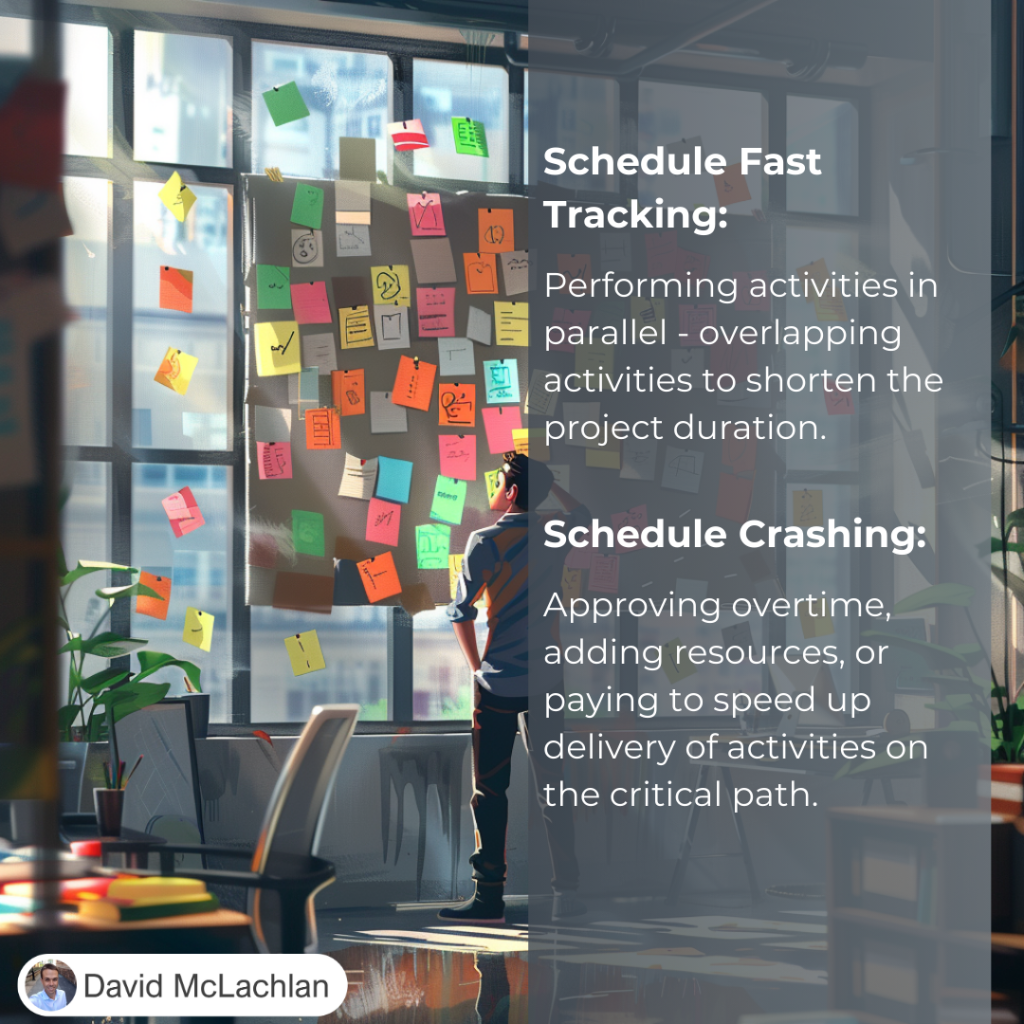
There are two main compression techniques that you’ll see on the PMP exam and in the Project Management Body of Knowledge, and even in your project management career. Those two are “crashing” the schedule, which shortens the schedule duration by adding resources. That can be very costly as we’re adding more people or things. The other one we’re looking at is fast tracking, where activities or phases normally done in sequence are now performed in parallel or at the same time for at least a portion of their duration. That way we’re able to cut back on the time frame.

Schedule Compression

Let’s look at a few examples.

Crashing might involve approving over-time, adding resources, paying to expedite the delivery of activities on the critical path. Of course because of that crashing may result in increased risk, and certainly an increased cost.

As an example up the top here we’ve got Task 1, Task 2, Task 3 as our normal schedule with just one person assigned to each. But if we’re crashing this project schedule we’re adding resources to it, so now all of a sudden we’ve got a lot more resources there and we’re able to shorten the time of that task.

You have to be aware of the law of diminishing returns here, where sometimes adding more and more people -your return on that investment will get less and less over time. Sometimes adding more people isn’t the answer. But in this case, when we’re crashing a project we’re looking for that to be the answer to reduce our project schedule.

The other one is fast tracking, where we’re performing tasks in parallel. Again this might result in rework and an increased risk and cost, and it only works when activities can be overlapped to happen at the same time, to shorten the project duration on the critical path. We’re using the lead time, if there’s any lead time that we can take up we’re using that to perform those tasks in parallel. For example one, two, three in sequence but now one, two, three we’re performing some of these activities at the same time by fast tracking our project. Because we’re able to do that we don’t have to add more resources in this case, so the cost is a little bit less than if we were to crash the project with project resources. And that is the idea of schedule compression, crashing your schedule and fast tracking your schedule.

– David McLachlan

– See All Project Management Key Concepts –

The Critical Path and Float

– See All Project Management Key Concepts –

Critical Path and Float - PMBOKThe Critical Path and Float

This is separated into two parts, with the first outlining the Critical Path, and the second doing the forward and backward pass on the critical path method. Now all of this it can seem a little daunting at first, that’s why we’ve just separated it into two videos, but ultimately this one will give us a broad overview and the next one we’ll delve into it in a little bit more detail.

What is the critical path?

The critical path is the longest sequence of activities that make up a path through a project – so it is the longest sequence of activities, and that determines how soon were able to actually complete our project, which gives us the shortest possible project duration.

It’s the path that doesn’t have any slack in it – so there’s no leeway, no room to move, and that’s why it’s the most critical path.

The critical path method is used to calculate the critical path in our project, and the amount of free float and total float, which is the flexibility that we have in our schedule. Float is the leeway that we might have – can we delay an activity by one day or two days? If there’s two days of float, then yes.

Let’s have a look at an example.

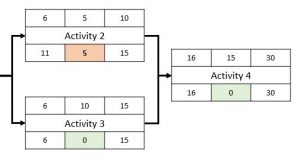
Let’s say we’re starting our project schedule, we’ve got these durations in the top middle of our schedule network diagram. In this case we’ve got the durations of 5 days, 5 days, 10 days for this one and 15 days for our last one. The float is described in the bottom middle box, so we’ve got zero days of float. In other words, there’s no leeway for this one there’s no leeway for this one and there’s no leeway for this. That means our critical path is A, C and D.

If you noticed we’ve got five days of float here, that means we could potentially delay this activity by 5 days, there’s a little bit of leeway and we’d still be able to get the project done at the same time. That’s the idea that we’re looking at.

So again broadly or at a high level, Free Float is the amount of time that a scheduled activity – so a single activity – can be delayed without delaying the early start of any of its future activities. Total float or project slack is measured by the amount of time that a scheduled activity can be delayed or extended without delaying the project finish date. So zero float, as we said, is shown on the critical path. There’s no leeway on that critical path, and that’s why it’s critical.

We will delve into this in more detail looking at the critical path method and the forward and backward pass to calculate all of these lovely values as part of your schedule model.

– David McLachlan

– See All Project Management Key Concepts –