20 Excel Shortcuts to Clean Up Your Spreadsheet Like a Pro

Note: Click on the video above to watch.
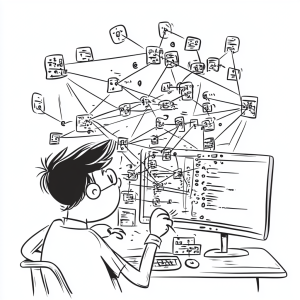
20 Excel Formatting Shortcuts to Clean up Your Data

If you’ve ever copied data into an Excel spreadsheet only for it to come out as a jumbled mess, you know how frustrating it can be to get everything looking just right. The good news is, here are over 20 formatting shortcuts that will help you tidy up your data and get it ready to impress your boss in no time. Let’s transform your chaotic columns into a perfectly formatted spreadsheet!

1. Select All Cells in a Column

To quickly select all cells below your current cell, press Ctrl Shift ↓.

To quickly select the entire table, use Ctrl A. To select all cells in a column or row, use Ctrl Space for columns and Shift Space for rows. This grabs every cell in that column or row, making it easier to apply changes.

2. General Number Format

Got a bunch of numbers and you want to set them to general format? Use Ctrl Shift ~ (that’s the tilde key next to the number 1) to revert them to a general number format.

3. Date Format

To format a column of dates consistently, select the column and press Ctrl Shift # (the hash key). This will give your dates a standard format.

4. Time Format

For times that are all over the place, select the column and press Ctrl Shift @ to apply a uniform time format.

5. Currency Format

To give your numbers a currency makeover, select the cells and press Ctrl Shift $. This will add dollar signs and standardize the formatting.

6. Scientific Format

If you need scientific notation, select your numbers and press Ctrl Shift ^. Perfect for those large or small numbers.

7. Percentage Format

Turn your numbers into percentages by selecting the cells and pressing Ctrl Shift %. If you need more decimal places, use Alt, H, 0 (zero) to add them. Press Alt, H, 9 to reduce decimals.

8. Remove Dollar Signs

If you want to get rid of dollar signs and revert to just numbers, select the cells and press Ctrl Shift ! (the exclamation mark key).

9. Select a Range of Cells

Use Ctrl Shift combined with the arrow keys (left, right, up, or down) to select a range of cells in the direction you choose.

10. Open Formatting Dialog

For more detailed formatting options, hold Ctrl and press 1. This opens the format cells dialog box where you can adjust everything manually.

11. Add Cells

To insert new cells, select where you want to add them and press Ctrl Shift + D. This allows you to expand your table with additional cells.

12. Remove Cells

To delete cells, use Ctrl – (minus sign). This will let you remove cells from your table quickly.

13. Copy and Paste Cells

Copy your selected cells with Ctrl C, and paste them with Ctrl V.

14. Bold Text

Make your text stand out by selecting it and pressing Ctrl B to bold it.

15. Italicize Text

For a bit of emphasis, use Ctrl I to italicize your selected text.

16. Underline Text

To underline text, select it and press Ctrl U.

17. Strikethrough Text

If you need to show text as strikethrough, use Ctrl 5. This crosses out your text for clear visibility.

18. Undo Changes

Made a mistake? Press Ctrl Z to undo your last action. It’s your safety net.

19. Redo Changes

Changed your mind again? Use Ctrl Y to redo the last undone action.

20. Resize Rows or Columns

To adjust the size of rows or columns, select them and use your mouse to drag the borders, or use the shortcut Alt, H, O, I to auto-fit the columns.

There you have it – more than 20 shortcuts to make formatting your spreadsheet a breeze. Whether you’re tidying up data or making it look sharp, these shortcuts will save you time and frustration. So go ahead, give them a try and watch your data transform from messy to immaculate in an instant!

Catch you next time with more handy tips and tricks. Happy formatting!

See more Excel Tips and Tricks: 

You can see what people are saying about David McLachlan here: REVIEWS

Navigate to Free Project Management and Leadership Articles through the links on the right (or at the bottom if on Mobile) 
PMI PMP 35 PDUs CourseThe Ultimate PMP Project Management Prep Course (35 PDUs)
Agile Certified Practitioner (PMI-ACP 21 PDUs)The Complete Agile Course: PMI-ACP (21 PDUs), Coaching, Jira and MORE! 
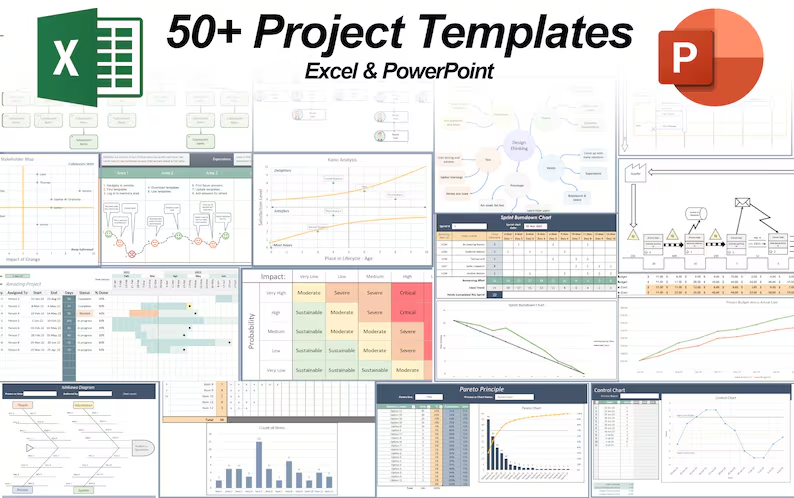
50 Project Management Templates Gantt Chart Risk Matrix and more Excel50+ Project Management Templates in Excel and PowerPoint (Gantt Chart, Risk Matrix and more!)
Project Management Plan TemplatesPre-made Project Management Plan Template: Save 100 HOURS!


How to Handle a Project Crisis

Note: Click on the video above to watch.

Handling a Project Crisis: What to Do When Things Go South

So, you’ve just been thrown into the deep end as the lead project manager, and things are looking pretty grim. You’ve got 300 people needing to move into a new building, but with just six weeks until the big day, you find out the new site isn’t even properly authorized, and it’s on tribal land in Arizona. To top it off, the current building is being sold, and the owner is adamant about not allowing remote work. Tomorrow, you’ll be negotiating with a business owner who thinks she’s always right. Sounds like a nightmare, right? Here’s how to tackle this mess like a pro.

1. Keep Cool and Don’t Take It Personally

First off, remember that project management is all about dealing with complex, often chaotic situations. It’s not about taking things personally but rather about finding solutions and options to move forward. If things are falling apart, it’s crucial to stay level-headed and focus on solving the problems rather than stressing over the situation.

2. Present the Reality with a Gantt Chart

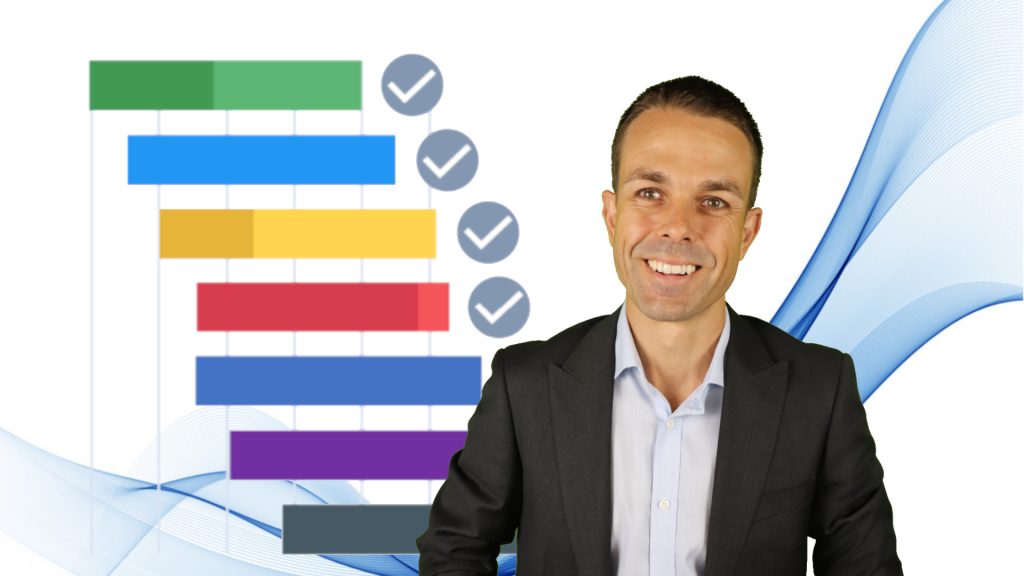
One of the best ways to handle a crisis is to lay out the facts clearly. Start by showing the business owner the current status of the project, including the remaining deliverables. Use a project schedule like a Gantt Chart to highlight where things are going to be delayed. Explain which risks or issues are causing delays and how this could potentially push the project back by months. A clear, visual representation of the situation can help make the urgency and impact more tangible.

3. Identify and Manage Risks

Next, categorize what’s happening as either a risk or an issue. A risk is a potential problem that hasn’t happened yet, while an issue is something that’s already occurred. Document these and assess their impacts.

Then, brainstorm possible solutions—can you expedite the process or find temporary alternatives? Assign costs and benefits to each option to help make an informed decision.

4. Use Cost-Benefit Analysis to Prioritize Options

When evaluating solutions, weigh the costs versus the benefits. For instance, if you can speed up getting the certificate of occupancy, what’s the cost, and how much time would it save? Present these options to the business owner to help prioritize which solutions offer the best trade-offs between cost and speed.

5. Employ People Skills

Dealing with a business owner who always thinks she’s right as is the case in this video could use a few people skills to navigate this tricky terrain:

Yes, And:

This technique, borrowed from improv comedy, involves agreeing with the person’s ideas and then adding your own input. For example, if the business owner insists on a certain approach, acknowledge it and then explain what the implications are and what additional steps might be needed. This helps keep the conversation positive and collaborative.

Communication Preferences:

Understand how the business owner prefers to communicate. Do they want detailed emails or face-to-face meetings? Tailoring your communication style to their preference can reduce friction and make your interactions more effective.

Deliver Small Wins:

Build trust by achieving and showcasing small victories. Regularly update the business owner with progress and minor successes to demonstrate that things are moving in the right direction.

Ask Open-Ended Questions:

Use open-ended questions to gather more information and encourage discussion. Instead of asking yes-or-no questions, ask, “What do you think we should do about this issue?” or “How would you like to handle this situation?” This invites the business owner to contribute ideas and feel more involved in the solution.

6. Keep Learning and Adapting

Remember, project management is a skill that improves with experience and continuous learning. Each project, especially the challenging ones, provides an opportunity to enhance your abilities. Stay focused on learning both the technical aspects of project management and the softer people skills that can make or break a project’s success.

Navigating through a project crisis can be daunting, but with a clear approach, effective communication, and problem-solving skills, you can steer the project back on track. Keep calm, stay organized, and remember that every challenge is a chance to grow. You’ve got this!

Until next time, keep pushing forward and learning from each experience.

See more Questions of the Day: 

You can see what people are saying about David McLachlan here: REVIEWS

Navigate to Free Project Management and Leadership Articles through the links on the right (or at the bottom if on Mobile) 

PMI PMP 35 PDUs CourseThe Ultimate PMP Project Management Prep Course (35 PDUs)
Agile Certified Practitioner (PMI-ACP 21 PDUs)The Complete Agile Course: PMI-ACP (21 PDUs), Coaching, Jira and MORE! 
50 Project Management Templates Gantt Chart Risk Matrix and more Excel50+ Project Management Templates in Excel and PowerPoint (Gantt Chart, Risk Matrix and more!)
Project Management Plan TemplatesPre-made Project Management Plan Template: Save 100 HOURS!


CAPM versus PMP – What Are They and Which Should You Choose?

Note: Click on the video above to watch.

CAPM versus PMP: Different Certificates for Different Times

If you’ve been considering diving into project management certifications, you’ve probably heard about the CAPM (Certified Associate in Project Management) and the PMP (Project Management Professional) from PMI (Project Management Institute). Both certifications can boost your career, but they cater to different needs and levels of experience. Let’s break down the key differences between them to help you figure out which one might be right for you.

Which Certification is Right for You?

CAPM:

If you’re new to project management or looking to switch careers, the CAPM is a great starting point. It’s designed for those who might not have a lot of project management experience but want to demonstrate their understanding of the basics. You don’t need years of experience to qualify for the CAPM, but you do need education and a willingness to learn.

PMP:

On the other hand, the PMP is for seasoned professionals who want to showcase their project management expertise. It’s ideal if you’ve already been leading projects and want to prove your advanced skills and experience. The PMP is recognized globally and can be a powerful credential if you’re aiming to advance in your career or work internationally.

Requirements to Apply

CAPM:

To apply for the CAPM, you need a secondary degree (like a high school diploma or GED) and 23 hours of project management education. The CAPM doesn’t require project management experience, making it accessible for those just starting out.

PMP:

For the PMP, you need more than just education. You need either a secondary degree or GED plus 5 years of professional project management experience, or 3 years of experience leading projects if you have a four-year degree. Additionally, you’ll need 35 contact hours of project management education. If you already hold a CAPM, those education hours count completely towards your PMP application instead.

Exam Differences

CAPM:

The CAPM exam consists of 150 questions to be completed in 3 hours. Of these, 135 are scored, and 15 are “seeded” questions used to test future exam content. The CAPM exam covers project management fundamentals, predictive methodologies (waterfall), Agile frameworks, and business analysis. The breakdown is roughly 36% fundamentals, 17% predictive, 20% Agile, and 27% business analysis in the CAPM Exam Content Outline.

PMP:

The PMP exam is a bit more involved, with 180 questions to be answered in 3 hours and 50 minutes (230 minutes). Out of these, 175 are scored, and 5 are seeded. The PMP exam focuses on people and soft skills (42%), project management processes (50%), and the business environment (8%). This reflects the advanced nature of the PMP and the comprehensive knowledge required.

What to Study for CAPM versus the PMP

CAPM:

To prepare for the CAPM, focus on the exam content outline, the PMBOK (Project Management Body of Knowledge) Guide, and PMI’s guides on process groups and Agile practices. The CAPM requires a solid understanding of project management fundamentals and methodologies.

PMP:

For the PMP, you’ll want to study the same resources as for the CAPM but in greater depth. The PMP also includes additional recommended readings and a more detailed examination of project management processes, leadership skills, and business environment. The PMBOK 7th Edition and the Agile Practice Guide are essential resources for this.

Final Thoughts

Both the CAPM and PMP certifications offer significant value depending on where you are in your project management career. The CAPM is a fantastic entry-level certification that can open doors to new opportunities, while the PMP is a prestigious credential for those with substantial project management experience looking to advance their careers.

Whichever certification you choose, both will enhance your project management skills and add value to your career. With dedication and the right preparation, you can successfully achieve either certification and stand out in the ever-evolving field of project management.

See more PMP Articles and Tips for Passing your Exam: 

You can see what people are saying about David McLachlan here: REVIEWS

Navigate to Free Project Management and Leadership Articles through the links on the right (or at the bottom if on Mobile) 
PMI PMP 35 PDUs CourseThe Ultimate PMP Project Management Prep Course (35 PDUs)
Agile Certified Practitioner (PMI-ACP 21 PDUs)The Complete Agile Course: PMI-ACP (21 PDUs), Coaching, Jira and MORE! 
50 Project Management Templates Gantt Chart Risk Matrix and more Excel50+ Project Management Templates in Excel and PowerPoint (Gantt Chart, Risk Matrix and more!)
Project Management Plan TemplatesPre-made Project Management Plan Template: Save 100 HOURS!


The Secret History of Agile: From Japan to America

Note: Click on the video above to watch.

hand drawn comic software and car manufacturer working togetherThe Secret History of Agile: Unveiling the Roots of a Revolutionary Methodology

The Agile methodology, a transformative approach in software development, is often mistakenly attributed solely to the Agile Manifesto of 2001. However, the roots of Agile stretch much deeper into history, with influences from manufacturing and even early industrial practices. Let’s check out the lesser-known origins of Agile, and see how it has really evolved from the 19th century to today.

The Waterfall Model: A Misunderstood Beginning

The story of Agile cannot be told without mentioning the Waterfall model, traditionally seen as the “enemy” of Agile. Interestingly, Winston Royce, who formalized the Waterfall model, came up with a more iterative and feedback-driven approach in his final notes. Royce emphasized the importance of integrating feedback from testing into design and requirements, advocating for an iterative process and customer involvement.

This philosophy, remarkably similar to Agile, shows that even the origins of the Waterfall model came from principles that Agile later embraced.

Early Industrial Influences: Toyota’s Innovations

Agile’s principles can be traced back to early industrial practices, particularly those pioneered by Toyota. In 1896, Sakichi Toyoda introduced the “Stop and Notify” concept, also known as Jidoka or autonomation. His invention of an automatic loom that halted production if a needle broke was revolutionary, combining human oversight with machine efficiency. This concept of built-in quality control is a cornerstone of Lean manufacturing and, subsequently, Agile.

Post-War Innovation: The Birth of Lean and Kanban

The real transformation began in 1948 when Toyota faced severe resource constraints post-World War II. This led to the creation of the Toyota Production System, the precursor to Lean manufacturing. Lean emphasizes waste reduction and Kaizen, or continuous improvement. From Lean, Kanban emerged, a method of visualizing the work to optimize flow. This later became integral to Agile software development.

The Agile Manifesto: A Culmination of Decades of Ideas

Agile as formally recognized today was crystallized in 2001 with the Agile Manifesto, but its foundations were laid much earlier. The Manifesto was influenced by various methodologies, including Lean, Kanban, Extreme Programming, Feature Driven Development and Scrum. These frameworks collectively contributed to Agile’s emphasis on flexibility, customer collaboration, and iterative development.

Scrum: A Revolutionary Approach

Scrum, often synonymous with Agile, has its roots in a 1986 white paper titled “The New New Product Development Game” by Japanese researchers Hirotaka Takeuchi and Ikujiro Nonaka. They proposed a holistic, team-based approach to product development, likening it to a rugby team working together to move the ball down the field. This approach emphasized overlapping development phases, self-organizing teams, and continuous learning—key principles that underpin Scrum and Agile.

The Six Secrets of The New New Product Development Game

Takeuchi and Nonaka identified six characteristics of successful product development teams, which resonate strongly with Agile principles:

  • Built-in Instability: Assigning broad goals to capable teams, granting them autonomy and flexibility to meet that goal.
  • Self-organizing Teams: Teams acting like startups, from ideation to implementation, fostering autonomy, self-transcendence, and cross-functional collaboration (the Product Owner idea in Scrum today).
  • Overlapping Development Phases: Continuous interaction between research and development and production to ensure constant progress and iteration.
  • Multi-learning: Encouraging team members to pursue ongoing learning, both within and outside their areas of expertise.
  • Subtle Control: Implementing visual management and maintaining open workspaces to facilitate communication and collaboration.
  • Organizational Transfer of Learning: Converting project activities into standard practices to spread knowledge throughout the organization.

As you can see there are many similarities between Scrum as we know it today, and The New New Product Development Game introduced in 1986, even if some of the names are different.

Conclusion: The Ever-Evolving Journey of Agile

The history of Agile is rich and multifaceted, drawing from various disciplines and evolving over decades. From Royce’s iterative vision for Waterfall to Toyota’s Lean principles and the collaborative ethos of Scrum, Agile embodies a continuous pursuit of improvement and adaptability. Understanding this deep and varied history not only enriches our appreciation of Agile but also underscores its enduring relevance in today’s fast-paced, ever-changing technological landscape.

For those eager to dive deeper into Agile’s principles and practices, comprehensive courses and coaching can offer valuable insights and practical skills. Embracing Agile is not just about adopting a methodology; it’s about joining a long-standing tradition of innovation and excellence in product development.

See more PMP Articles and Tips for Passing your Exam: 

You can see what people are saying about David McLachlan here: REVIEWS

Navigate to Free Project Management and Leadership Articles through the links on the right (or at the bottom if on Mobile) 
PMI PMP 35 PDUs CourseThe Ultimate PMP Project Management Prep Course (35 PDUs)
Agile Certified Practitioner (PMI-ACP 21 PDUs)The Complete Agile Course: PMI-ACP (21 PDUs), Coaching, Jira and MORE! 
50 Project Management Templates Gantt Chart Risk Matrix and more Excel50+ Project Management Templates in Excel and PowerPoint (Gantt Chart, Risk Matrix and more!)
Project Management Plan TemplatesPre-made Project Management Plan Template: Save 100 HOURS!


What to Put in Your Project Plan: Agile vs. Waterfall

Waterfall vs Agile project plansAgile vs. Waterfall Project Plans

The debate between Agile and Waterfall project management methodologies is a common one, with some individuals favoring Waterfall and others preferring Agile. However, the ultimate goal remains the same: successfully completing a project.

Let’s check out the differences and similarities between Agile and Waterfall project plans, focusing on the tools used in each methodology. It’s important to note that neither approach offers a “free pass”—both require diligent management of scope, stakeholders, schedule, cost, and quality.

Starting a Project: Waterfall

In a Waterfall project, the process begins with creating a business case to weigh the pros and cons of starting or delivering a new product. This is followed by the development of a project charter, which officially kicks off the project with resources and funding from the project sponsor. Early planning documents in Waterfall projects include a change control plan, configuration management plan for version control, benefits management plan, and a comprehensive project management plan covering scope, schedule, cost, and quality.

Starting a Project: Agile

Agile projects, on the other hand, kick off with a team charter and a high-level model of the system, such as a sequence or architecture diagram. Agile methodologies can also use a walking skeleton, a basic version of the system to which features are gradually added. Other planning tools in Agile include the business model canvas or lean canvas, which outline customer problems, proposed solutions, value delivery methods, and competitive advantages.

Gathering Stakeholders: Waterfall

Waterfall projects involve extensive stakeholder planning. A stakeholder register is created to list all stakeholders, classify them by influence and impact, and outline engagement strategies. This detailed planning helps ensure effective communication and stakeholder management throughout the project.

Gathering Stakeholders: Agile

Agile projects also require stakeholder engagement but typically involve less documentation. A team charter outlines the project’s vision, mission, background, team roles, stakeholders, values, and communication and decision-making processes. Agile projects often feature small, co-located teams, typically around nine members, to facilitate quick communication and collaboration.

Gathering Requirements: Waterfall and Agile

Requirement gathering in Waterfall projects involves creating detailed documentation and a requirements traceability matrix to track requirements through to completion.

Agile projects, being more customer-focused, offer various methods for gathering requirements, such as the business model canvas, lean canvas, prototypes, mockups, storyboards, test cases, and acceptance criteria. Agile emphasizes iterative feedback and adaptation to meet customer needs.

Scope and Deliverables

In Waterfall projects, scope and deliverables are defined by a high-level scope description, prioritized features, a work breakdown structure (WBS), and a WBS dictionary detailing resources, costs, dependencies, and durations. The goal is to plan everything upfront, ensuring all work packages are defined before execution.

Agile projects use a product backlog, consisting of high-level epics and detailed user stories. Similar to a WBS, user stories are broken down into manageable tasks for each Sprint. Agile scope management includes mockups, storyboards, user story mapping, and prioritization methods like cost-benefit analysis. Scope is accepted through Sprint reviews, providing regular customer feedback.

Project Schedules

Waterfall schedules involve breaking down the scope into an activity list, sequencing activities, estimating durations, and creating a detailed schedule, often visualized in a Gantt chart.

Agile projects utilize a product roadmap, which can resemble a Gantt chart, to outline feature delivery timelines. Sprint planning determines the work for each Sprint based on team velocity and capacity. Progress is tracked using burn-up and burn-down charts.

Cost Management

Waterfall projects estimate costs for each work package, including contingencies for risks and management reserves for unforeseen scope changes, resulting in an approved baseline budget.

Agile projects typically operate on a fixed-cost model, with a stable, small team working within a set budget and timeframe. The product backlog is prioritized to deliver the highest value items within the fixed budget.

Quality Management

Quality in Waterfall projects is managed through a test and inspection plan, usually conducted at the end of the project.

Agile projects integrate testing throughout development, using techniques like test-driven development (TDD), code inspections, unit testing, and continuous delivery. Quality is verified through Sprint reviews and ongoing customer feedback.

Resource Management

Both methodologies require resource management. Waterfall projects estimate resource needs, create a resource breakdown structure, and assign roles and responsibilities using a responsibility assignment matrix (RAM).

Agile projects emphasize a whole-team approach, with co-located teams of T-shaped individuals possessing a broad skill set and deep expertise in one area. Agile teams use visual management tools and pair programming to enhance collaboration.

Procurement Management

Waterfall projects involve detailed procurement processes, including make-or-buy analysis, source selection criteria, and vendor management.

Agile projects prefer integrating necessary skills within the team but may use fixed-cost, variable-scope contracts to accommodate changing requirements.

Communication Management

Waterfall projects use communication management plans and communication styles assessments to tailor communication methods to stakeholder preferences.

Agile projects prioritize open communication with daily standups, Sprint planning, Sprint reviews, and retrospectives. Visual management tools and open team areas facilitate ongoing communication and collaboration.

Different, But the Same

While Agile and Waterfall project management methodologies differ in their approach, both aim to deliver successful projects. Waterfall focuses on extensive upfront planning and documentation, while Agile emphasizes flexibility, customer feedback, and iterative development. Understanding the strengths and weaknesses of each methodology helps project managers choose the best approach for their specific project needs.

See more PMP Articles and Tips for Passing your Exam: 

You can see what people are saying about David McLachlan here: REVIEWS

Navigate to Free Project Management and Leadership Articles through the links on the right (or at the bottom if on Mobile) 

PMI PMP 35 PDUs CourseThe Ultimate PMP Project Management Prep Course (35 PDUs)
Agile Certified Practitioner (PMI-ACP 21 PDUs)The Complete Agile Course: PMI-ACP (21 PDUs), Coaching, Jira and MORE! 
50 Project Management Templates Gantt Chart Risk Matrix and more Excel50+ Project Management Templates in Excel and PowerPoint (Gantt Chart, Risk Matrix and more!)
Project Management Plan TemplatesPre-made Project Management Plan Template: Save 100 HOURS!


How To Learn and Study FAST

Hand drawn boy learning at computerFour Game-Changing Learning Techniques

Have you ever struggled with school or learning something new? Whether you’re studying for a degree, a certification like the PMP, or just trying to grasp a new concept, learning can be challenging. However, everything changed for me when I discovered effective learning techniques. Here are four strategies that revolutionized my approach to learning. These methods complement each other and are incredibly easy to implement. Let’s dive in!

Technique 1: Mind Mapping and Work Breakdown Structure (WBS)

The first technique is mind mapping. Popularized by Tony Buzan in the 1970s, mind mapping is a powerful memory technique. It helps set the scene for your entire learning journey by visually organizing information. Here’s how it works:

Start with the Core Idea:

Place your main topic at the center. For instance, if you’re studying project management, this would be your central idea.

Branch Out:

From the central idea, create branches for subtopics like scope, schedule, and cost. Each of these subtopics can further branch out into more detailed topics, such as turning schedules into activities and then into project timelines.

This method gives you a high-level overview and helps you understand how different concepts interconnect.

In a similar vein, the Work Breakdown Structure (WBS) breaks down a project into smaller, more manageable parts. For example, if you’re preparing for a marathon, your core components might include shoes, training, and stretching. Each of these can be broken down further (e.g., different types of training or stretches).

Technique 2: Practice Exams

Once you have a high-level overview with mind maps, it’s time to delve deeper using practice exams. Practice exams are beneficial because they force your brain to store and recall information. By actively searching for it in your memory, you are embedding it more effectively. Here’s why they work:

  • Recall and Apply: Practice exams make you search for and apply information in various scenarios, reinforcing your knowledge.
  • Real-World Application: They simulate real-world conditions, helping you prepare for actual exams or practical situations.

Regardless of your field—be it project management, mathematics, or any other subject—practice exams are a proven method to deepen your understanding and retention.

Technique 3: The Feynman Method

Named after renowned scientist Richard Feynman, the Feynman Method involves teaching what you’ve learned to others. This technique takes your learning to the next level for a few reasons:

  • Understanding the material enough to speak about it: To teach something effectively, you need to understand it enough to talk about it.
  • Answering others’ questions: Teaching others means fielding their questions, which helps clarify and reinforce your knowledge.

You can practice this method with study friends by giving short lessons or presentations. The process of explaining and discussing topics with others solidifies your understanding and uncovers any gaps in your knowledge.

Technique 4: Focus Techniques (Pomodoro, Peer Pressure, White Noise)

Even with all the right techniques, learning can be challenging if you lack focus. Here are some strategies to improve your concentration:

  • Pomodoro Technique: Break your study time into 20-minute intervals using a timer. After each interval, take a 5-minute break. This method helps overcome procrastination by making study sessions more manageable.
  • Positive Peer Pressure: Study in quiet places like libraries where the focused environment encourages you to concentrate.
  • White Noise: Use background sounds like rain or crickets, which can help drown out distractions and enhance focus. You can find 10-hour loops of these sounds on YouTube.

As you practice these techniques, your ability to focus will improve over time.

You Can Do It!

By using these simple techniques of mind mapping, practice exams, the Feynman Method, and effective focus techniques, you can transform your learning experience and take it to the next level. These strategies will help you retain information, understand complex concepts, and ultimately succeed in your studies. Start implementing them today and become a learning superstar. You can do it!

See more PMP Articles and Tips for Passing your Exam: 

You can see what people are saying about David McLachlan here: REVIEWS

Navigate to Free Project Management and Leadership Articles through the links on the right (or at the bottom if on Mobile) 

PMI PMP 35 PDUs CourseThe Ultimate PMP Project Management Prep Course (35 PDUs)
Agile Certified Practitioner (PMI-ACP 21 PDUs)The Complete Agile Course: PMI-ACP (21 PDUs), Coaching, Jira and MORE! 
50 Project Management Templates Gantt Chart Risk Matrix and more Excel50+ Project Management Templates in Excel and PowerPoint (Gantt Chart, Risk Matrix and more!)
Project Management Plan TemplatesPre-made Project Management Plan Template: Save 100 HOURS!


9 Excel Features you MUST know – 15 Minute Zero to Hero

comic boy learning at computerExcel is a powerful tool that can enhance your productivity in project management, data analysis, and many other fields.
What if you want to become a superhero in Excel in just 15 minutes? This video and article show you the 9 tips you need to be amazing in Microsoft Excel, and your boss and colleagues will truly be amazed! Here they are – the nine essential Excel features that you should know to amaze your friends:

1. Pivot Tables

Pivot tables are a great way to summarize large sets of data. They allow you to organize and manipulate your data to get a simplified view.

To create a pivot table:

  • Select your data range and format it as a table.
  • Go to Insert > PivotTable.
  • Choose the data range and decide where you want the pivot table to be placed.
  • Drag and drop fields to rows, columns, values, and filters sections to customize your pivot table.

For example, you can count the number of job titles in different countries and filter the data by departments.

2. VLOOKUP

VLOOKUP is used to find and retrieve data from a specific column in a table.

To use VLOOKUP:

  • Type =VLOOKUP(lookup_value, table array or area, column number you’re looking for, Exact Match yes or no).

For example, =VLOOKUP(A2, data_table, 2, FALSE) will search for the value in cell A2 within “table array or area” and return the corresponding value from the second (2) column. This is particularly useful when you need to match employee IDs with their names, job titles, salaries, and bonuses.

3. Quick Analysis and Data Bars

Quick Analysis allows you to apply conditional formatting, create charts, and more with a few clicks.

To use Quick Analysis:

  • Select your data range.
  • Click the Quick Analysis button that appears at the bottom right.
  • Choose options like Data Bars, Color Scale, or Icon Set to visualize your data quickly.

Data bars visually represent the value in each cell, making it easy to see variations at a glance.

4. IF Then Else Statements

IF statements help you perform logical tests and return different values based on the results.

To create an IF statement:

  • Type =IF(logical_test, value_if_true, value_if_false).

For example, =IF(B2 > 100000, “Yes”, “No”) will check if the value in B2 is greater than 100,000 and return “Yes” or “No” accordingly.

This can be used to check if salaries exceed a certain amount.

5. Spark Lines

Spark lines are tiny charts within a cell that provide a visual representation of data trends.

To insert spark lines:

  • Select your data range.
  • Go to Insert > Sparkline > Line.
  • Choose the data range and the cell where you want the sparkline to appear.

Spark lines are useful for displaying trends in salaries across different countries.

6. Wildcard

Wildcards allow you to perform partial matches in your data searches.

To use a wildcard:

  • Type =COUNTIF(range, “*criteria*”).

For example, =COUNTIF(B2:B10, “*manager*”) will count the number of cells that contain the word “manager” within the specified range.

This feature helps in searching for specific terms within job titles.

7. TRIM

TRIM removes unwanted spaces from text.

To use TRIM:

  • Type =TRIM(text).
  • For example, =TRIM(A2) will remove any extra spaces from the text in cell A2.

This ensures that your data is clean and free of unnecessary spaces.

8. Transpose

Transpose changes the orientation of your data from rows to columns or vice versa.

To transpose data:

  • Select your data range and copy it.
  • Right-click where you want to paste the data, choose Paste Special, and select Transpose.

This feature is useful for reorganizing data to fit your needs.

9. Case Conversion

Excel functions can change text to uppercase, lowercase, or proper case.

To change case:

  • Use =UPPER(text) to convert to uppercase.
  • Use =LOWER(text) to convert to lowercase.
  • Use =PROPER(text) to convert to proper case.
  • For example, =UPPER(A2) will change the text in A2 to all uppercase letters.

These nine features can significantly enhance your efficiency and effectiveness in using Excel. Practice these techniques to get up to speed with Excel quickly and make your data management tasks easier and more productive. Happy Excelling!

See more Excel Tips and Tricks: 

You can see what people are saying about David McLachlan here: REVIEWS

Navigate to Free Project Management and Leadership Articles through the links on the right (or at the bottom if on Mobile) 

PMI PMP 35 PDUs CourseThe Ultimate PMP Project Management Prep Course (35 PDUs)
Agile Certified Practitioner (PMI-ACP 21 PDUs)The Complete Agile Course: PMI-ACP (21 PDUs), Coaching, Jira and MORE! 
50 Project Management Templates Gantt Chart Risk Matrix and more Excel50+ Project Management Templates in Excel and PowerPoint (Gantt Chart, Risk Matrix and more!)
Project Management Plan TemplatesPre-made Project Management Plan Template: Save 100 HOURS!


Insights from the 2023 Project Manager Salaries Report

Maximizing Your Earning Potential

The latest 2023 Earning Power Report from the Project Management Institute (PMI) gives a few clues for the benefits of holding a Project Management Professional (PMP) certification. For those considering whether to get their PMP, this might just be what you need to see, with some pretty compelling data on how a PMP can influence your salary across different regions and roles.

PMP Certification and Salary Impact

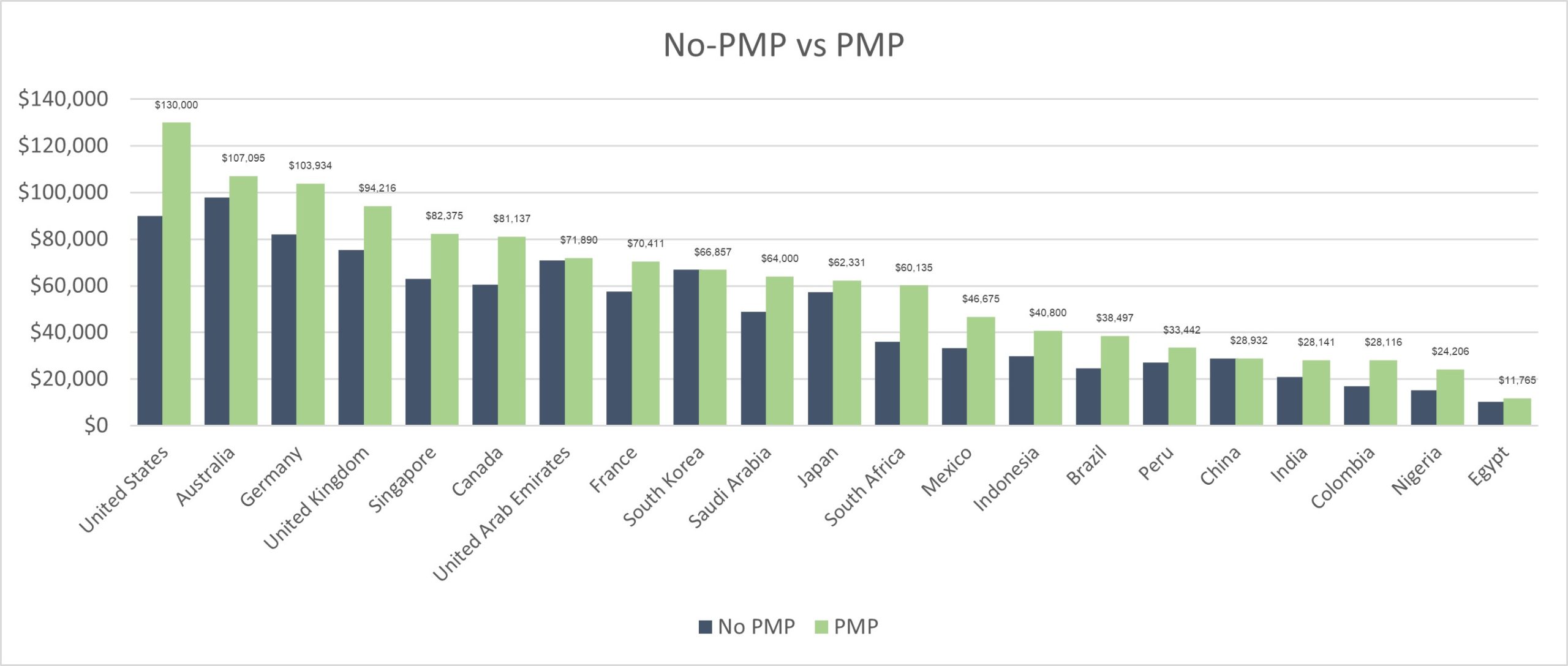
PMP Versus no PMP - Salaries

The report actually shows there is a decent salary boost for project managers who hold a PMP certification compared to those who do not. Here’s a quick overview of how PMP holders fare around the globe:

  • United States: Project managers with a PMP certification earn an average of $130,000, significantly higher than their non-certified peers.
  • Australia: PMP-certified project managers earn about $108,000, showing a strong return on investment.
  • Germany: With an average salary of $113,000, Germany also reflects the value of a PMP certification.
  • United Kingdom: Certified project managers earn around $94,000.
  • Singapore: The average salary stands at $82,000 for PMP holders.

Salary Increases by Country With a PMP

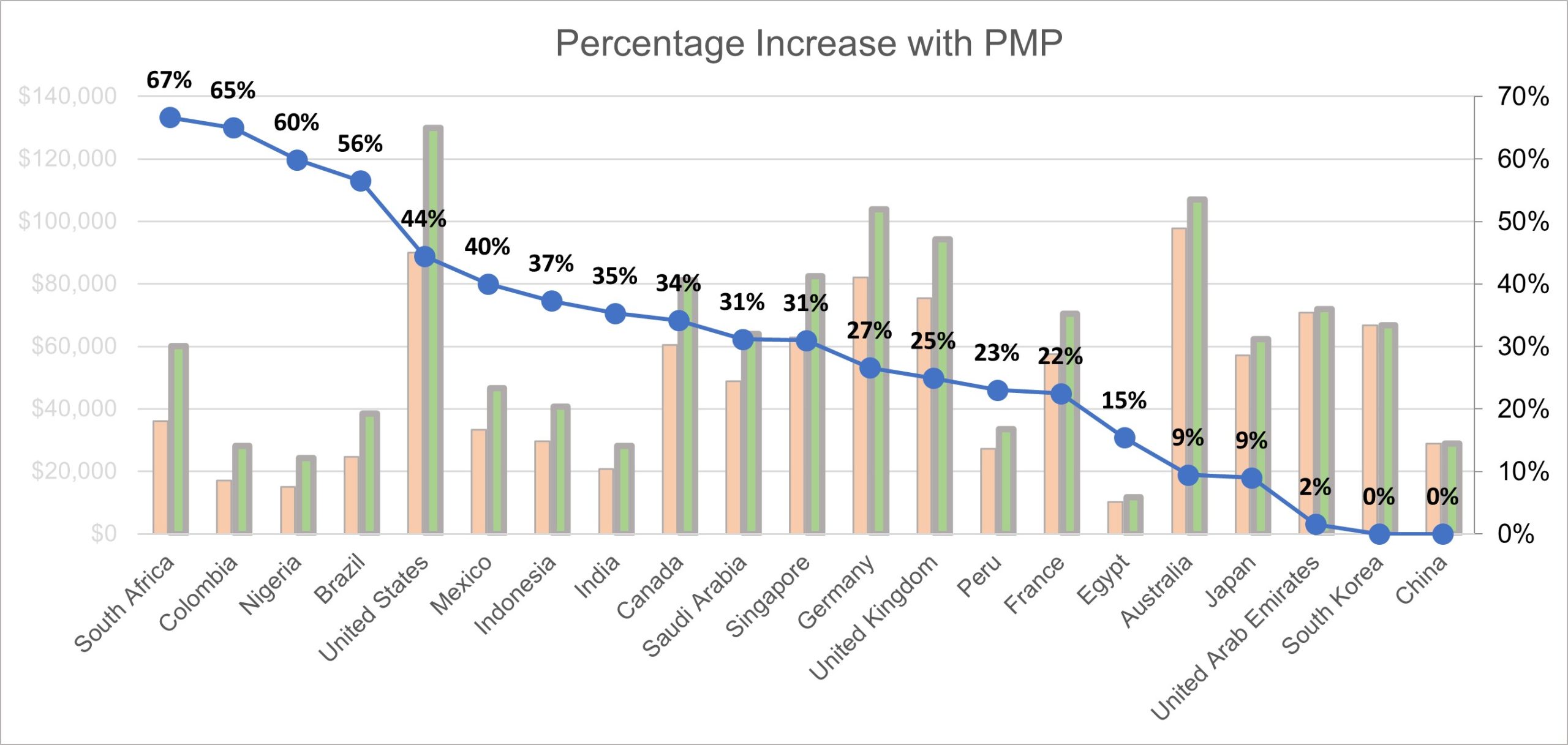
Percentage increase in salary with PMP - Project Management

The percentage increase in salary from obtaining a PMP varies by country, but here are the ones that stand out:

  • South Africa: A remarkable 67% increase, translating to a jump from $38,000 to $60,000.
  • Colombia: PMP holders see a 65% increase in their earnings.
  • Nigeria: With a 60% increase, PMP certification proves highly beneficial.
  • Brazil and the United States: Both countries experience a 40-50% rise in salary.
  • Germany: Offers a 27% increase.
  • United Kingdom: Gives a 25% increase.
  • Australia: Provides a 10% increase.

In dollar terms, these increases can be substantial:

  • United States: An average increase of $40,000.
  • South Africa: Around $25,000.
  • Germany: Approximately $21,000.
  • Canada: $20,000.
  • Singapore: $9,000.

Advancing to Program Management

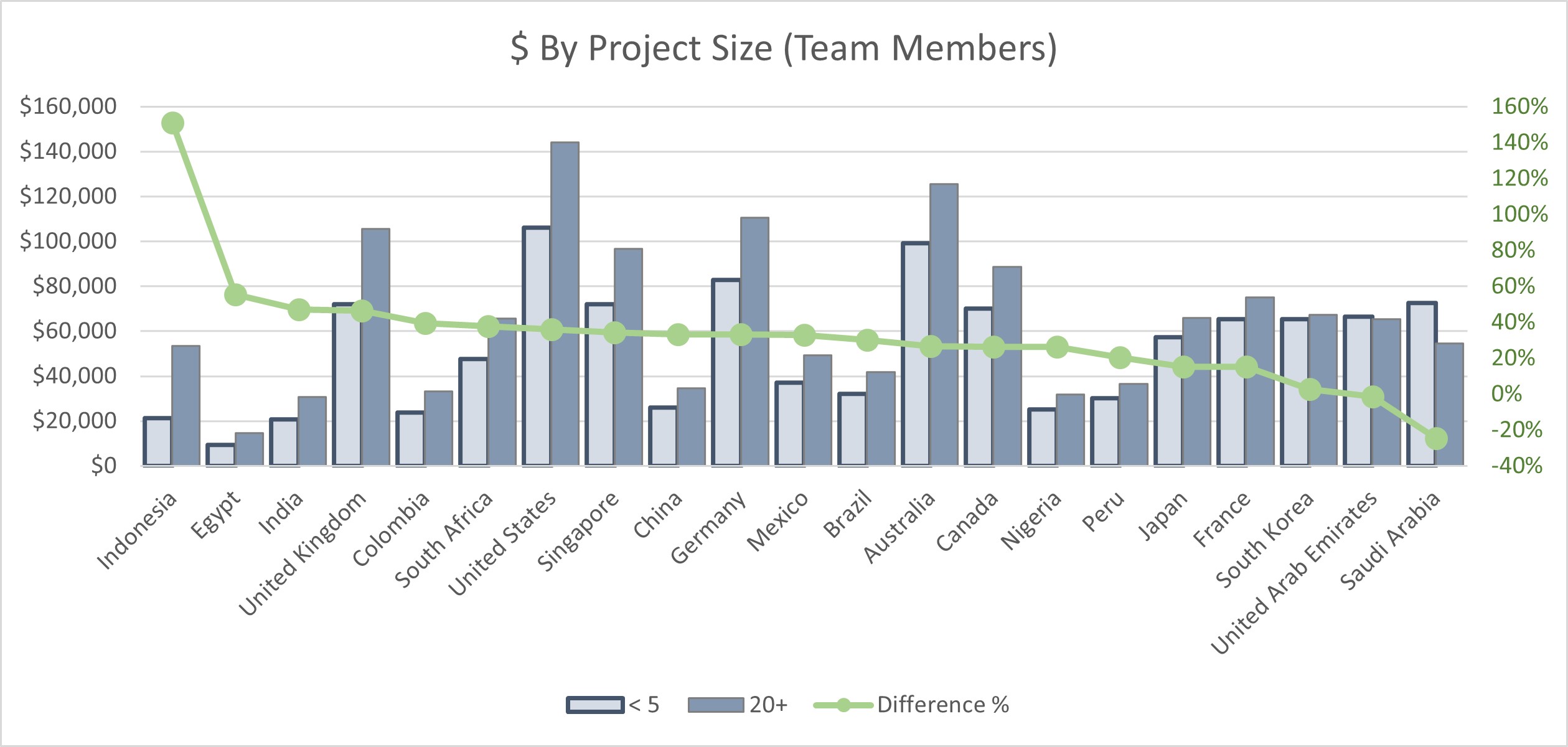
Project Manager salary increase with larger teams

The report also highlights the financial benefits of transitioning from a project manager to a program manager. Program managers, who oversee multiple projects, typically see a 35% average salary increase. Countries like Saudi Arabia and Colombia report even higher jumps, making this career advancement a lucrative opportunity.

Managing Larger Projects

Project Manager Salary Increase when Program Manager - PMP

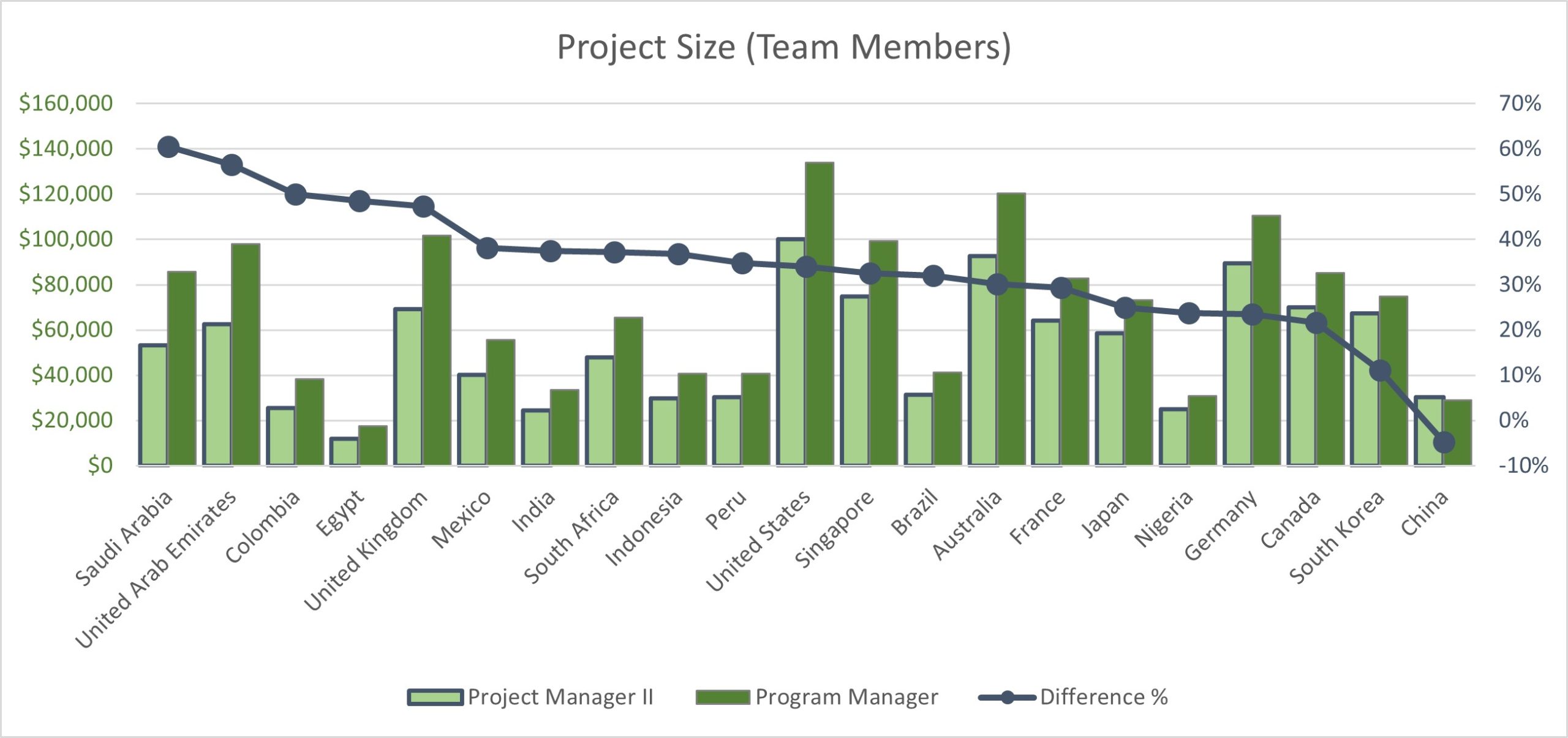
Managing larger projects with 20 or more team members instead of smaller teams can also enhance your earning potential. The report notes an average salary increase of 30% for those managing larger projects.

You Can Do It

Getting your PMP certification, advancing to program management, and managing larger projects can all make a big difference to your salary.

  • PMP Certification: Provides a 33% average salary increase.
  • Program Management: Offers a 35-40% increase.
  • Larger Projects: Results in a 30% increase.

For project managers aiming to increase their earning power, the evidence is clear: pursuing a PMP certification, advancing to program management roles, and managing larger projects are effective strategies. With determination and effort, you can leverage these insights to enhance your career and financial prospects.

See more PMP Articles and Tips for Passing your Exam: 

You can see what people are saying about David McLachlan here: REVIEWS

Navigate to Free Project Management and Leadership Articles through the links on the right (or at the bottom if on Mobile) 

PMI PMP 35 PDUs CourseThe Ultimate PMP Project Management Prep Course (35 PDUs)
Agile Certified Practitioner (PMI-ACP 21 PDUs)The Complete Agile Course: PMI-ACP (21 PDUs), Coaching, Jira and MORE! 
50 Project Management Templates Gantt Chart Risk Matrix and more Excel50+ Project Management Templates in Excel and PowerPoint (Gantt Chart, Risk Matrix and more!)
Project Management Plan TemplatesPre-made Project Management Plan Template: Save 100 HOURS!


Is This The Only Thing You Need To Pass The PMP Exam?

The Secret To Passing The PMP Exam – The Exam Content Outline

If you’re gearing up to take the Project Management Professional (PMP) exam this year, you may have come across various study materials and guides, each claiming to hold the key to passing the test. However, there is definitely one document you should prioritize: the PMP Exam Content Outline (ECO). While it isn’t a textbook or practice guide, it IS a detailed outline of the exam provided directly by the Project Management Institute (PMI).

The PMP Exam Content Outline is crucial because it goes into exactly what the exam will cover. You can get is for free on the PMI website, and it breaks down the exam into key domains: People, Process, and Business Environment. By understanding these areas in detail, you can focus your study efforts on exactly what is required to pass the exam.

Why the PMP Exam Content Outline Matters

The ECO provides a comprehensive breakdown of the domains and their respective weightings in the exam. For instance, it highlights that the:

  • People” domain constitutes 42% of the exam,
  • Process” makes up 50%, and;
  • Business Environment” accounts for 8%.

This can help guide your study and help you allocate your time effectively.

Focus on What PMI Considers Important

Since the ECO is published by PMI, it reflects the specific areas of knowledge and skills that the institute deems essential for the PMP exam. Studying this document ensures that you align your preparation with the actual content of the test.

The ECO is also free and accessible – readily available for download from the PMI website. Simply search for “PMI ECO PMP” to find the document and use it as a foundation for your study plan.

Using the ECO Effectively

While the ECO provides a detailed outline, it does not delve into the specific techniques or methodologies required for each task. So personally I would pair this with some comprehensive project management education, including the 35 contact hours or professional development units required for the exam. Here’s a quick overview of what you need to know for each domain:

People:

Focus on managing conflict, leading teams, supporting performance, and building a cohesive team. It also covers skills in negotiation, collaboration, and virtual team management.

Process:

Encompasses the execution of projects from start to finish, including managing communications, risks, budgets, schedules, quality, and changes. It also involves determining the appropriate project methodology and governance structure.

Business Environment:

This is where we ensure compliance, evaluating and delivering project benefits and value, addressing external business changes, and supporting organizational change.

You Can Do It

The PMP Exam Content Outline is an indispensable tool for your exam preparation. By thoroughly understanding and using it alongside other study resources, you can enhance your chances of success. Dive into the ECO, combine it with solid project management education, and you’ll be well on your way to passing the PMP exam with confidence.

I believe in you, and I know you can do it! Remember – “Hard work beats talent, when talent doesn’t work hard.” You can do this!

See more PMP Articles and Tips for Passing your Exam: 

You can see what people are saying about David McLachlan here: REVIEWS

Navigate to Free Project Management and Leadership Articles through the links on the right (or at the bottom if on Mobile) 

PMI PMP 35 PDUs CourseThe Ultimate PMP Project Management Prep Course (35 PDUs)
Agile Certified Practitioner (PMI-ACP 21 PDUs)The Complete Agile Course: PMI-ACP (21 PDUs), Coaching, Jira and MORE! 
50 Project Management Templates Gantt Chart Risk Matrix and more Excel50+ Project Management Templates in Excel and PowerPoint (Gantt Chart, Risk Matrix and more!)
Project Management Plan TemplatesPre-made Project Management Plan Template: Save 100 HOURS!


Is the PMP Still Worth it in 2024?

PMP – Overpriced or Valuable Certification?

If you’re investing in your education this year, the Project Management Professional (PMP) certification is still a hot topic. Many people have heard that the exam may not be well-regarded enough, and that it requires ongoing maintenance through Professional Development Units (PDUs). Despite that, the PMP certification still offers significant benefits in 2024.

Benefit 1: It Makes It Easy To Hire You

Firstly, the PMP is valuable because it makes it easier to hire you. Recruiters frequently use “PMP” as a key search term to quickly identify qualified candidates, making it easier for job seekers with this certification to get noticed and shortlisted. This shortcut can be a significant advantage in a competitive job market.

Having the PMP itself shows recruiters that you have at least three years of experience leading projects, and have put many hours into your own education on Project Management – something many managers NEVER do. This sets you apart from the competition.

Benefit 2 – New Tools To Help Your Current Projects

Secondly, the process of studying for the PMP can help your current projects. Many professionals report gaining new insights and tools that enhance their project management skills. The certification covers essential areas such as project management processes, the business environment, and soft skills like leadership and communication, which can lead to practical improvements in your career.

I know it has personally helped me in my career, in starting new projects, getting the right support, helping stakeholders support the project, and ensuring the right value is delivered on time and on budget.

Benefit 3 – The PMP Is Still The Most Recognized PM Certification

Thirdly, the PMP is the most recognized project management certification globally, far surpassing alternatives like PRINCE2 or Scrum Master certifications. Its widespread recognition, with over 200,000 searches each month, just shows how valuable it can be, and its relevance across every industry where projects are managed.

Disadvantage – PDUs Too Hard and Expensive?

Many people say that having to maintain the certification every 3 years with ongoing “Professional Development Units” (PDUs) and more money to keep the certification current is too much.

This step is optional, however. You don’t have to maintain the certification. Simply gaining it in the first place is valuable, and shows you have put in the work. Often, your job experience would take over from there after a few years.

But a CPA in Accounting has a similar deal where they maintain their education and the CPA to show they are still current in the industry. It really is your choice.

Benefit 4 – It won’t make you less marketable

Lastly, earning a PMP certification will not diminish your marketability. Even if the certification does not lead to immediate job opportunities, it provides a strong foundation of knowledge and demonstrates a commitment to professional growth.

In summary, the PMP certification continues to offer valuable benefits, including improved job prospects, enhanced skills, and global recognition. For those willing to invest the effort, it remains a worthwhile endeavor in 2024.

Never Forget – You Can Do It

With a little hard work and persistence, you can gain this certification and improve your job prospects, improve your current projects with the things you will learn, and improve your options for your future career.

It can be hard, but I know you can do it. Keep going. Do something every day, no matter how small. In one years’ time you will have grown and changed, and you will not recognize the amazing person you have become.

See more PMP Articles and Tips for Passing your Exam: 

You can see what people are saying about David McLachlan here: REVIEWS

Navigate to Free Project Management and Leadership Articles through the links on the right (or at the bottom if on Mobile) 

PMI PMP 35 PDUs CourseThe Ultimate PMP Project Management Prep Course (35 PDUs)
Agile Certified Practitioner (PMI-ACP 21 PDUs)The Complete Agile Course: PMI-ACP (21 PDUs), Coaching, Jira and MORE! 
50 Project Management Templates Gantt Chart Risk Matrix and more Excel50+ Project Management Templates in Excel and PowerPoint (Gantt Chart, Risk Matrix and more!)
Project Management Plan TemplatesPre-made Project Management Plan Template: Save 100 HOURS!